
Allow LinkedIn Connections To Download Your Email Address
By Mike Maddaloni on Tuesday, February 23, 2021 at 11:34 AM with 0 comments
LinkedIn has long offered the ability for its users to download a list of their connections contact information. However at some point in time the business social network threw in a roadblock – your connections need to allow your email address to be included in a downloaded file. Each one of them. Individually. Seriously.
Most people are unaware you have to make this selection. I first learned about this opt-in setting from veteran tech journalist John C. Dvorak. I then allowed my connections to see my email address in their download files, and then I checked how many of my connections opted to do this – of my 1,676 connections downloaded, only 24 email addresses were in the file. Twenty four. That’s only .0143%!
Granted some of my connections may not want their information in a downloaded file as someone maybe doing so to spam email them. But among those whose email addresses were not in the list are some whom I consider “power networkers.” My guess is they are simply unaware of this setting.
Below I will show you how you can download a list of your connections, then how to make the setting change. I tested this with my friend Gary T. Sanborn as his email was not in my downloaded list, but was after he made the setting change.
How to download your contacts
Perform the following steps – these were done in a standard Web browser, and may vary in the LinkedIn mobile app.
- Navigate to LinkedIn.com and login
- Click "Me" in the top navigation, then "Settings & Privacy" from the menu
- Click "Get a copy of your data"
- Check "Want something in particular..." then check "Connections"
- Click "Request archive" button
- Enter your password in pop-up window and click "Done" button
- You will see a "Download pending" message
- Await an email that the download is available, or refresh the page and click the "Download archive" button
- Open the Zip file and extract the Connections.csv file
- Open the CSV file and sort by email address to see how many addresses you actually have
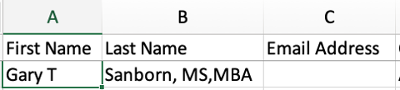
As you can see below in my initial list, Gary’s email address was missing. Interestingly I can view his email address on his profile page, as that is a different setting.
When I mentioned this to Gary, he had no idea about it. I then asked him to go through the following steps, to which he obliged as he is a sharing, networking kind of guy.
How to allow someone to download your email address
Perform the following steps – again, this works in a standard Web browser.
- Navigate to LinkedIn.com and login
- Click "Me" in the top navigation, then "Settings & Privacy" from the menu
- Click "Visibility" in the left sidebar
- Click "Who can see or download your email address" to expand the area
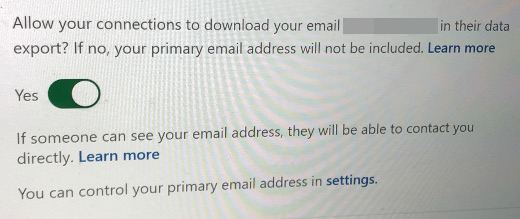
- Under the option "Allow your connections to download your email [your email address] in their data export? If no, your primary email address will not be included." slide the switch to Yes (as shown in the screenshot above)
- You will see a green "Saved" indicator that your choice has been saved
After he made the change, I followed the first set of steps and requested another download of my connections, and his email address was in the new list.

Deconstructing Downloading Email Addresses
I urge all of my own connections and anyone reading this to make this setting change. If you are on LinkedIn, you are there to connect with people. If people want to manage your contact information in their own database, and yes perhaps send you emails, they should be able to easily do so. Where I understand LinkedIn likely wants to mitigate people getting spam email, they should also make this setting change front and center so the masses are aware of it, as the numbers show they are not.
This is from The Hot Iron, a journal on business and technology by Mike Maddaloni.
Did you enjoy this? Subscribe to The Hot Iron by RSS/XML feed or Read by Email
Business • Social Media • Strategize • (0) Comments • PermalinkRemove LinkedIn Connections Without Them Knowing
By Mike Maddaloni on Wednesday, October 28, 2020 at 09:33 PM with 0 comments
Recently I got an alert on LinkedIn that someone viewed my profile. I knew who this person was as they were a connection. Well, I thought they were one, for when I looked at their profile we were no longer connected. My guess was they viewed my profile solely for the purpose to remove the connection between us, and yes, as you may guess there’s a long story here that I will purposely not share.
What this person didn’t realize, and many others do not as well, is that you can remove someone as a connection on the business social networking site without them even knowing it. It is not completely obvious that you can do so, however. As I have known about it for years and maybe even did it once or twice myself, I will share my stealth disconnect secret in the wide open here.
The Steps to Disconnect
Here’s the steps to remove a LinkedIn connection using a standard desktop/laptop Web browser.
1. Navigate to LinkedIn.com, select My Network in the top navigation bar, then under Manage my network click on Connections.
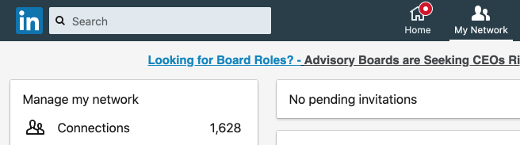
2. Search and scroll, but do not click – the key here is to not open someone’s profile, rather scroll to it in the list of connections. You can try entering a partial name to search, but do not click on their name. If you’re unsure, simply scroll to the bottom of your connections, which may take a while, then use Ctrl-F (on the PC) or Command-F (on the Mac) to find the name of the contact.
For this exercise, I chose my friend and long-time The Hot Iron reader Gary. Don’t worry, I won’t actually disconnect from you!

3. Click the ellipsis (the 3 dots) to the far right of their entry on the list, which will display the option to Remove connection, and click it.
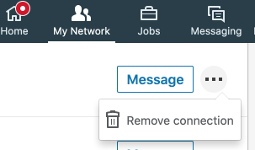
4. You will be presented with a pop-up to confirm to Remove Connection. As the message says, they won’t know that you did. Click Remove to proceed, or Cancel if you don’t want to, as I did.
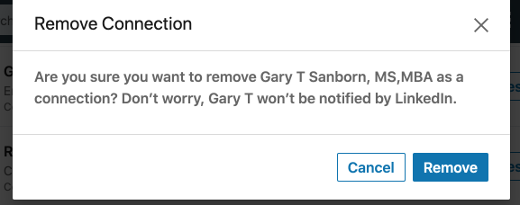
You will receive a confirmation message when complete, and your connection count will be one less.
To Remove or To Not Remove Connections
This is not the first time I talked about removing LinkedIn connections, as it first came up for me over 8 years ago in this post on how I removed them then. As you may guess, the functional process is much different now. But in re-reading this original post (and adding an editor’s note on its now-outdated content) the reasons for removing connection remain the same, both in what I stated as well as comments to the post. Nothing is forever, as I mentioned in that post, and it certainly holds today. Even the “wise man” who told me is someone I haven’t spoken to in years.
Deconstructing Removing LinkedIn Connections
Removing connections on any social network is a reality. However it’s good to know you have options on how to do it, especially if you don’t want the other person to know you have made a disconnect.This is from The Hot Iron, a journal on business and technology by Mike Maddaloni.
Did you enjoy this? Subscribe to The Hot Iron by RSS/XML feed or Read by Email
Business • Strategize • Technology • (0) Comments • PermalinkConsulting For A Greater Cause
By Mike Maddaloni on Wednesday, October 21, 2020 at 09:40 PM with 2 comments

I have often said the technology needs of non-profit organizations are similar to those of for-profit businesses. To begin with, many for-profit businesses are actually non-profit, but I digress. Where the difference comes into play is in the significance of the technology to support the mission of the organization, especially when it has a greater cause. The following is a true story and the name of the organization have been withheld to protect the innocent.
What this particular organization offers to its community – services for inner-city youth – is vital. When it comes to their tech infrastructure, they needed help, and that’s how I came into the picture. I first got involved with a past program they had with refurbishing computers for kids, later consulting to them pro-bono on their Web site through my previous Web business.
One day, and I remember it was July the third, I got a phone call late in the day from the Executive Director of this organization. A few days earlier on July the first, they switched to a new Internet provider in their office, something I was aware of. However, what I was not aware of – and neither was their Executive Director – was the hosting of their Web site and email went away with the switch, as it was at their previous provider. As a result, their Web site went down, and so did their email.
Part of the reason why I supported the organization, in addition to the great things they did, was the Executive Director himself. His professionalism and enthusiasm could have him leading any corporation. So as he acknowledged what happened and what they didn’t prepare for, in his unique style he asked for my help. How could I not? Despite the timing before the holiday, I told him I could restore his Web site and email accounts by the time they were back in the office on July the fifth.
Even while I was on my call with him, I was putting together a plan to restore their services. Luckily I had recently taken a copy of their entire Web site so I was able restore it. I established new Web hosting and email and setup and configured it all. Once completed I crafted instructions for managing email, sending it to the Executive Director’s personal email. In the message I let him know I will offer the hosting to them at no cost.
When they got back in the office after the holiday, I got emails from their new email accounts thanking me for all I did.
Deconstructing Consulting For A Greater Cause
I gladly setup and offered the organization its hosting as I was helping a greater cause. Although what I did for them was not pushing the technical limits of what I can do, it was up there with the most gratifying work I have done. Today I look back on this with pride for the important services I was able to offer this vital organization.
This is from The Hot Iron, a journal on business and technology by Mike Maddaloni.
Did you enjoy this? Subscribe to The Hot Iron by RSS/XML feed or Read by Email
Diversions • Strategize • (2) Comments • PermalinkConnecting With A Colleague
By Mike Maddaloni on Thursday, October 15, 2020 at 05:45 PM with 0 comments

In today’s remote working environment, often we struggle to connect with people we work with who are also in the same boat. However we soon forget that when we were working in the same office and sitting around the same table with these same people, we still had this problem. I had a challenge like to this once with a teammate that I, as well as others, hadn't really connected with. I decided to make the extra effort to bridge the gap with this person, all to a successful outcome.
At the time I was with an international firm on an international project based in Boston. On the project was a mix of people from the Boston area, around the US and a few from around the world. One in particular was from Australia. When he came into the office, his presence was known. He dressed a little differently from the rest of us had a certain swagger. Not to forget he had a unique accent. None of this really mattered to me, and I introduced myself to him and told him I looked forward to working with him. Despite this initial outreach, I wasn’t really sure he felt the same towards me.
Often this colleague and I were in the same meetings, representing our teams on the project. I learned quickly he didn’t mix words and would speak honestly, though not always the most appropriately, at least by American standards. Often he would mix colloquial terms from Australia into work discussions, causing people to scratch their heads. As a result, many people focused on how he was saying something rather than what he was saying.
I looked at this situation differently. Here was someone who had come from another part of the world and was now stationed in Boston; though Boston is a very international and cosmopolitan, it still harken back to its conservative colonial roots. He came into this ever-expanding group and was trying to make a name for himself.
A Literally Off The Shelf Solution
One day I looked ahead and saw I was scheduled to be in a meeting with him the next. That night I was thinking of how I could finally break the ice with him. As I looked around my home office I found the answer sitting on my bookshelf. The next day I brought it in to work, a book of Australian slang. It was given to me years earlier by another colleague from Australia. It was a rather thick book, the size of large novel. Even though I had held onto it for years, I never thought it would come in handy in this capacity.
As we gathered the next day in a conference room, I sat directly across from my colleague from Down Under. Just as a meeting started, I looked across the table at him and taking the book out, I slammed it on the middle of the table. As did, I said something to the effect that he wasn’t going to get away with using any Australian slang expressions on me any longer.
To this he was a at first taken aback, then he looked straight at me and smiled. From that point forward, we had a much better working relationship, and I got to know him more personally as well. It all happened because I was simply willing to work to make a connection with him.
Deconstructing Connecting with Colleagues
Every situation is different and sometimes we don't always get it right. When it comes to personalities, I feel it's definitely worth trying to connect with people. Many times just from that effort we can gain appreciation and for each other and work well together.
This is from The Hot Iron, a journal on business and technology by Mike Maddaloni.
Did you enjoy this? Subscribe to The Hot Iron by RSS/XML feed or Read by Email
Business • Strategize • (0) Comments • PermalinkMy Losing 53-Word Story Contest Entry
By Mike Maddaloni on Monday, September 14, 2020 at 08:41 PM with 4 comments
Several years ago I “got into” writing. Granted, I was blogging here at The Hot Iron for over a decade at that point. Even with a body of work – some of it even beyond the world of business and technology – I never considered myself a “writer” per se. Visiting the Lit Fest in Chicago and taking it all in for the first time, a mere few blocks from my then home, was the boost I needed. Where I haven’t published yet beyond this Web site, I have expanded on what I write here, and have in various stages pieces in need of time to finish and submit for possible publishing.
That is if you don’t count some short stories I have submitted recently. And the emphasis here is on short – as in 53 words short. On and off for the last year I have submitted entries for the monthly 53-Word Short Story contest by Press 53, a fiction and poetry publishing house in North Carolina. I discovered this when looking for writing contests for one of my kids, who at one point was interested in such contests then later wasn’t. However I got bitten by this serial unique challenge.
For August’s contest, the writing prompt was to write about “Sunday.” That’s it, that’s all they give you, and it is up to your creativity – and brevity – to craft something unique and prize-winning. As you can tell by the title of this post I did not win, and as a result my prose will not be published in one of their journals.
But as words must be free, I share “Any Given” with you here:
"While awaiting our lobsters to brighten, we slurped steamers – simmered in Harpoon IPA, from the same Portsmouth dock as the crustaceans. Aptly accompanying our ocean harvest was corn on-the-cob, homemade potato salad and more of said IPA.
Ten o’clock may seem early for such a feast, but there’s only three hours till kick-off."
The preceding is a true story, as annually we would have a lobster bake during one week’s tailgating before a New England Patriots home game back in the day.
If you’re so inclined you can read the winning entry here, learn about this month’s contest and how you too can compete with me for the fame and glory of a very, very short story.
Deconstructing Short Story Writing
Writing can take many forms. What I originally saw as business and technology writing was in reality story writing, and upon that realization it opened and expanded my mind to what else I could write. But I will save an in-depth deconstruction for another time – just get out there and write!
This is from The Hot Iron, a journal on business and technology by Mike Maddaloni.
Did you enjoy this? Subscribe to The Hot Iron by RSS/XML feed or Read by Email
Announcements • Diversions • Strategize • (4) Comments • PermalinkSubscribe to The Hot Iron



The Hot Iron strives to present unique content and point-of-view on business, technology and other topics by Mike Maddaloni, a technology strategist based in Appleton, Wisconsin.
Photo credit: Logan Connor/Oomphotography
Value for Value
If you like what you are reading on The Hot Iron, buy me a coffee!
About Links
In posts here at The Hot Iron there are often links and banner ads for products and services. For some of these links and banner ads, I receive compensation if you click and/or eventually buy said products or services. Where most links are marked as such, it is safe to assume any link or banner ad is a compensated one.