
Livestreaming Swim Meets – The Latest and Greatest
By Mike Maddaloni on Thursday, November 23, 2023 at 10:07 AM with 0 comments
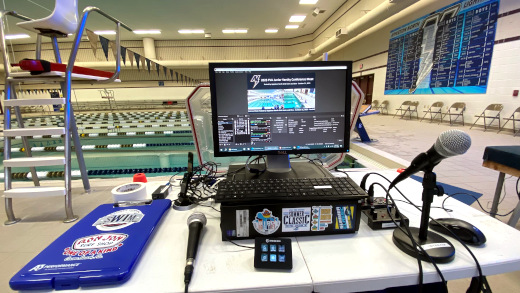
It’s been over a year and a half since I first wrote about the work I and others have done with livestreaming swim meets, and what a time it has been. Since that original post the gear and team has covered over a dozen swim meets to thousands of viewers. Along the way we have made a myriad of improvements to the process and equipment, and I would like to share these as well as what we learned along the way.
Still livestreaming swim meets?
Some reading may be thinking, you’re still livestreaming? Isn’t that a thing of the past? Sure, the efforts started in 2021 was born of necessity, but the demand hasn’t lessened. Where some venue and sports have suspended livestreaming, I and others wholeheartedly disagree. From busy families to distant friends and relatives, the ability to see live action in a quality broadcast persists. Even though there are commercial, automated solutions available where you have to pay to watch a limited-featured broadcast, the emphasis on quality keeps me and the others in our crew doing what we are doing.
The Breakdown
Below I organized the changes and improvements with the software, hardware, audio and content areas of livestreaming. Where the picture above shows our latest configuration, you can watch the culmination of the efforts involved with the latest recorded broadcast of my high school’s hosting of the Junior Varsity Conference swim meet on YouTube.
Software
We are still using OBS Studio and even with the more we have done with it, we are still barely scratching the surface on its capabilities. A combination of built-in features new to us as well as plugins to the platform allowed for ease of management and enhanced capabilities.
We started using Scene Collections for each swim meet and team to better organize them. This allows us to switch between color and scene configurations easily with little required enhancements to them. I say required as many times we are copying scenes from one collection to another due to something new I learned or want to experiment with. For example, I have some collections for a meet with multiple scenes that is manually managed, as well as collection with a single scene for an “autopilot” meet – once I couldn’t be there to direct the meet, so we left a single scene on, and one of the crew started and stopped it for each meet session. The single scene incorporated 2 cameras and the scoreboard, as you can see here:
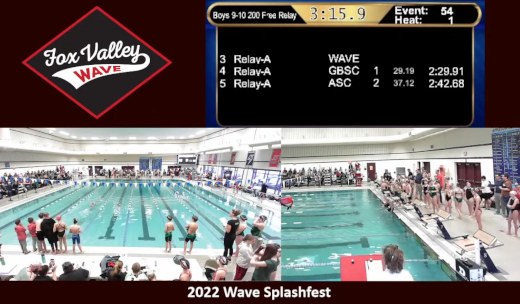
To make the management of scenes easier, I installed the Source Copy plugin for copying and moving scenes between collections. Even if you don’t think you will use this, if you are livestreaming multiple meets or events, you will. Another plug-in we started using was the OBS-NDI v 4.9.2 from dev47apps for NDI cameras and iPhone. This allowed us to use our iPhones as a Web cam, and it was amazingly easy to do so. In addition to the plug-in we installed the NDI HX Camera app on our iPhones. Where the app was a little on the pricey side at US$20, it was worth what we gained in flexibility. As long as the iPhone was on the same network as the OBS computer, we could simply select the NDI source and what was on the phone was in a scene. We experimented with this at our summer meets to get close-up footage of races ending at the far end of the pool as well as a roving camera for awards presentations.
Other enhancements to our livestreams came from learning features in OBS. As our scoreboard was out for a while, we had a need to easily update the current event and heat in the swim meet. We did this with loading the events and heats into a text file with each one on its own line, then used this in a text source to read the first line of the file. When editing the text file to remove the top line, upon saving it the new top line would appear in the scene. Another enhanced use of text was to add a crawler or horizontally-scrolling text on a scene. This tutorial is a good example of how to add a crawler.
Hardware
Although we only made one true addition to our hardware, it was a significant one – an Elgato Stream Deck Mini. A Stream Deck is a device with multiple buttons that can be programmed by accompanying software on the computer to execute any commands, and not just for OBS, but it is very popular among livestreamers. After much deliberation I decided on the Mini with just 6 buttons. Why? There are usually a handful of scenes that are a go-to, and programming them to Stream Deck buttons made scene switching a breeze. And with only 6, sometimes you didn’t even need to look at the buttons to know where which was which. We did program one button to throw up a graphic with no sound as an “oh shit” scene in case we needed to cut away from all cameras.
Another enhancement could fall under hardware, and that was the use of 3M Command strips and hooks. We use the Velcro-like Command strips to mount the cameras, and they stay up with no problems. We also use Command hooks for running cables along the walls. The nice thing about them is that even though they are designed to easily be removed, the strips and hooks have stayed up in the high-humidity environment of a pool for several years now.
Audio
Audio thus far has been an Achilles’ Heel of the broadcasts. The first few meets we livestreamed years ago did not have any audio at all. Where later on we toyed with tapping into the swim meet announcer’s microphone, we decided to add our own audio and do our own play-by-play. We have been lucky to have the announcer we do for the high school girls swim meets, and I have been getting more comfortable with this duty as time goes on, building on my meet announcing experience.
When the mic was off, however, we would not be sending any audio over the livestream. This would throw YouTube warnings we simply ignored. It also made for a poor audio experience to go from dead air to someone’s booming voice. I was able to eliminate the dead air by adding an open source audio file of ambient indoor pool sounds and looping it. There are many out there to choose from, and unfortunately I never saved the source link for the main file I use to share with you. This looping audio allowed for a more overall natural sounding broadcast.
Originally the mic we used was a low-end USB mic, and it did a good job but not a great one. The sound was distorted and even with some adjustments to OBS audio settings there wasn’t much improvement. We then decided to up the game by borrowing a mixer and an XLR microphone. The quality improved but there was static and some distortion I attributed to the audio cable between the mixer and the computer audio input jack. When I decided to try a USB cable I found this refurbished mini USB Pyle mixer for the same price of a cable. Adding 2 Shure PGA48 microphones gave us a dramatically better sounding broadcast, as can be heard in the meet livestream link above.
Content
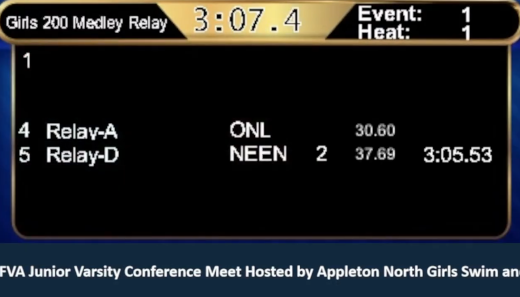
Building upon bringing in the Web scoreboard mentioned in the last post, I wanted to see if we could bring in what was displayed on the Daktronics scoreboard for high school meets. As I mentioned earlier the scoreboard was out for a few meets, but when it came back a representative from Daktronics was at the meet and I politely cornered him to ask how we could do this. It turns out the scoreboard console generates a Web page with the image of what’s live on the scoreboard. We were able to take the URL of that Web page into a browser source so the entire scoreboard could be in its own scene, as shown here:
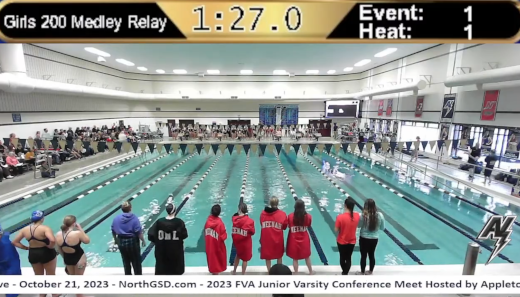
As well, I added a crop of the scoreboard and put it at the top of all scenes so the event, heat, event title and clock was always displayed on all scenes, as shown here:
Other content improvements included custom thumbnail images for each meet in YouTube. These were created using GIMP, open-source graphics software comparable to PhotoShop, then taking the image with the meet logo and text and setting it in YouTube Studio for the livestream. I also made a video of the school’s logo and animated text using Canva, a cloud-based, easy to use design platform. Although I only have the free version, I was impressed with how much I could do with it.
So What’s Next?
Where the list of improvements is not only long but game-changing for our livestreams, there still more I want to do. There are many features of OBS I have yet to play with, and if only I had the luxury of time to research and experiment more.
A hold-over from the last post was a pan-tilt-zoom, or PTZ, camera. An example of one is the Move 4K from PTZOptics. A challenge we have is the cameras would be mostly used outdoors or in high-humidity natatoriums. Surprisingly we have had little issues with our ~US$50 Webcams and can afford to have extras. But with prices starting at ten-times that of a standard Webcam, it’s outside of my own budget. To mitigate any issues with the environment, PTZOptics has partnered with a firm to make outdoor camera covers. These are nothing short of amazing, but carry a cost as much as a camera and would add significantly to our load and the logistics of how to mount them as it is huge. All that being said, recently learning about these makes them more within reach.
Deconstructing Livestreaming Improvements
My trajectory for our livestreaming efforts is to make a broadcast that I and others would enjoy watching. Where for years people have – and still do – say what they are looking at is good enough, it is because there is no other option for them. As is clearly stated in the text and pictures here, there’s a better way. With a small investment in time and equipment, a quality livestream experience can become a reality for all.
This is from The Hot Iron, a journal on business and technology by Mike Maddaloni.
Did you enjoy this? Subscribe to The Hot Iron by RSS/XML feed or Read by Email
Strategize • Technology • Thrive • (0) Comments • PermalinkBrowsing What’s Possible
By Mike Maddaloni on Thursday, October 12, 2023 at 06:44 AM with 0 comments
A recent chance visit to a retail store became the catalyst of a serendipitous journey on how I do research into my job and seek information in general.
After dropping off my mobile device to get a new battery installed, I was told it would be ready in an hour. As I don’t wear a watch and my phone is how I know what time it is, I decided to peruse some of the stores along the strip mall, inside at least one I hoped would have a clock to let me know when I could return to the repair shop. At this later hour on a Saturday the only other store open was Hobby Lobby.
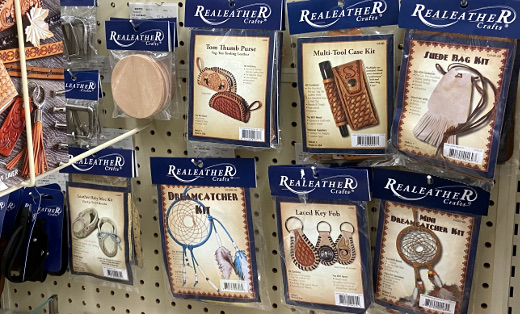
I had never been in a Hobby Lobby store before, but I know people who have. Before walking in I assumed it had – wait for it – hobby supplies, but more for crafting. To my surprise I found you could do everything from plan a wedding to decorate for Christmas (ugh, in August) to design clothes to make pinewood derby care like I did in Cub Scouts so long ago. There was a lot more, including the leather craft kits I had as a kid, but I’ll spare you the reader of details of the plethora of supplies available there.
But these were not just supplies. Rather I saw them as ideas – dare I say catalysts – for creating almost anything. Where it was awe inspiring, another way to look at it was overwhelming. As my head was filling with ways to spend lots of money, it was also filling with thoughts of how I work and do research on technology.
Search and Hopefully Seek
Today we don’t browse anymore, instead we search and specifically I am referring to finding information online. We enter in a search phrase or query and hope what is on the resulting page is exactly what we are looking for. In some cases it is, or perhaps are we simply settling for what the search engine returned to us as the best option? Search engine optimization, or SEO, may have been done on some information you are looking for but not all, impacting what is presented to you. Other information that may be a better solution for you may have been relegated to page 6 of the results. Factor in algorithms and paid search engine marketing, or SEM, and search results could be way off from what you seek.
Going into the store was different than had I gone to their Web site. With the former I had plenty of time, was meandering the aisles of the store and making mental notes of what was available. Had I gone to their Web site, which I never had before or since, I likely would have been looking for something specific and certainly would not have seen the wedding accessories and supplies, for example. Not that I am looking to get married again (once was all I needed!), though the awareness of what is available and possible would not be complete for me. But I digress.
Is Too Much a Good Thing?
I didn’t feel blown away after I left the Hobby Lobby store, namely as my recollection of what was there was fairly general. I of course recall some specifics as I mentioned above and others I will again spare you of (did I mention they have model trains too?). As I had time to kill I casually took it all in, for turning down each aisle was literally a new adventure.
However what if it was not so casual, and I was looking for something specific in the store and didn’t have all the time in the world? Upon entering and seeing the wide variety that was mere feet beyond the door, I would have been driven to the customer service desk for the shortest path to what I needed. Even if my request was general (sorry, can’t think of a good crafting idea here) I would have wanted directions to the area or areas of the store with surgical precision.
We do this today and I will admit to it. We are often too focused on what we are looking for and want the best answer in haste. I take shortcuts too – I typically use Presearch as my primary search, but if I am in a hurry and want the “best” option I will often go right to Google, enhanced tracking of me be damned as well as the spoils to those who invest in SEO and SEM.
Another area we encounter this is with software features – you have heard of the 80/20 rule, right? This is where 80% of the people will use 20% of the features. At this point we don’t even know every feature of, say, Microsoft Word. I know in writing this post I am maybe using a handful of “features” such as spellcheck and headings, and I wouldn’t even know where to find a comprehensive list or what is new in the next version of Word I keep getting prompted to install. On a larger scale I encounter this at work where when we upgrade to a new version of the software for the program I lead we need to scour very technical documentation for the nuggets of information we need to translate to our very non-technical users.
Deconstructing the need to explore
Back at Hobby Lobby, among the myriad of products I discovered one item that was not readily available was a working, accurate wall clock. When I got through the checkout with the few things I had – I resisted the urge to buy the whole store and only selected a few greeting cards – my receipt showed I was there well over an hour, and cutting it close to pick-up my phone before the repair shop closed. After securing my device, I pondered my last hour so on the ride home. I believe things happen for a reason, and I include this experience as well. In this case the reason was that I needed this timeout to explore something new, to remind me to get back to tapping into my curiosity to truly seek what’s out there to come up with what’s truly possible.
This is from The Hot Iron, a journal on business and technology by Mike Maddaloni.
Did you enjoy this? Subscribe to The Hot Iron by RSS/XML feed or Read by Email
Strategize • Thrive • (0) Comments • PermalinkGood And Great
By Mike Maddaloni on Monday, August 07, 2023 at 07:33 PM with 0 comments

It’s been nearly 20 years since I took the Intro to Improv program at The Second City in Chicago, and nearly three-quarters of that time since I have performed with an improv troupe. Yet not a week goes by where I am recalling or leveraging something I learned or experienced from those days. Where I feel I haven’t done justice to writing about that intensely creative time in my life, allow me to share some advice that has stuck with me from then to today.
One of my instructors was Nick Johne, a veteran of The Second City main stage in Toronto (for those who don’t know the term main stage refers to the top improv troupe that performs on a theater’s main stage). My troupe was thrilled to have someone of his caliber to teach us, despite the fact that he could never remember any of our names. This was a minor detail, as he was a fountain of knowledge.
There were a couple of sayings he used during class. And they were truly expressions, as it was not just his words but his overall physicality that accompanied what he said that guided us. During a class we would do multiple scenes, mixing students throughout the session. After one scene, a fellow student said that something they did was bad. This was immediately dismissed by Nick, when he said (and of course I am paraphrasing but tightly), “there’s no such thing as bad or good in improv, there’s ‘good’ and ‘great.’” He elaborated that when someone performs, there is thought and effort involved and as a result it could not be “bad.” He instead called that “good.” On the flipside of good is “great,” where if what was performed was superior and to the point where Nick could “watch it all day” (another expression of his).
Not bad and good, but good and great.
This mindset has stuck with me over the years, and I think about it often in my personal and work life. We are often our own worst critics and I am no exception to that. Maybe by framing something as good but not great will help us the next time we do whatever it is we are being hard on ourselves over? As a way of motivating others around us, we can “yes, and” and say what they did was “good,” and here’s how we could make it “great.” Advice on making is great was something Nick would follow-up with when saying what we did was good.
In the case of improv, the response of good and great is almost instantaneous. Whether a teacher saying it or an audience audibly reacting to it. However we often don’t get feedback on what we do outside of the improv world that soon – if ever, and if so, sincerely. For ourselves and for others, we may have to be a little intensely retrospective to find what was good and great, as our first inclination may be what was bad and good.
Years later my wife and I went to a show on one of smaller The Second City stages in Chicago and there performing in the ensemble was Nick. She suggested that when I go up to him after the show and congratulate him on it – a common thing to do to actors and improvisors following a performance – I should mention I was one of his students years earlier. Where I did compliment him after the show, I didn’t add the second part of her suggestion, as I am sure he wouldn’t remember me.
Deconstructing Good and Great
So the next time someone asks you how your day was, and if it may not have been up to even your lowest expectations, respond that it was good. But not great, and that you hope tomorrow is a great day. It could be the beginning of an attitude change. I know that is my hope in doing so myself.
This is from The Hot Iron, a journal on business and technology by Mike Maddaloni.
Did you enjoy this? Subscribe to The Hot Iron by RSS/XML feed or Read by Email
Strategize • (0) Comments • PermalinkGoogle Domains Shutting Down Not A Second Too Soon
By Mike Maddaloni on Tuesday, June 27, 2023 at 11:04 AM with 0 comments
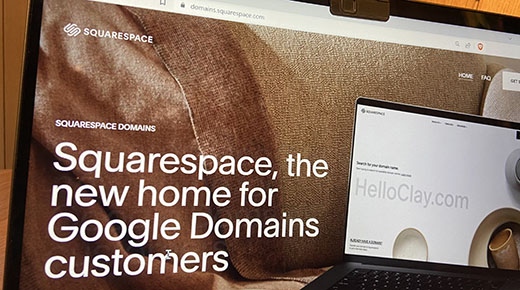
They say, “all good things must come to an end.” Whoever they are, they may have also said “even some not so good things come to an end as well.” The latter will fortunately come true in the form of Google announcing it is getting out of the domain name business and selling their domain registrations to Squarespace.
This news from the Big Tech behemoth came out late in the day on June 15 with little fanfare. I heard about it on a social media post and had to dig to find the press release announcing the deal. Even as of the writing of this post close to a couple of weeks later there is no mention of the deal on the home page of Google Domains. Digging into Google help I was able to find a mention of it. Not surprising to me, there is mention of it on Squarespace’s home page, with a link to a robust welcome page.
If you can tell by my choice of words so far, I think this is a very good thing. Why? Where Google loves collecting information about people, they don’t like dealing with people. You can’t exactly pick up the phone and call Google for support on their end-user consumer products, everything from Gmail to their Web advertising product AdSense. Interestingly on the Google Domains home page it states you can “get 24/7 Google support from real humans” which made me laugh, for as recently as within the last year that was not the case.
Out with the Old and In with the New
In the course of performing my primary income source (aka my job) I deal with many domain registrars, including Google. Many of my clients have had problems with Google domains as the login to the registrar service is integrated with the overall Google login process. Some clients have had turnover in their business and have had issues getting back into their accounts. In one case, a Web site was down for over 2 weeks because of this. No telephone support was available to accept a credit card to renew the domain name and following their automated account recovery process sadly took that long. I’m not sure exactly when they added real humans to the mix, but it is too little too late in my mind, and I have for years been suggesting people use other registrars like Name.com.
Squarespace, on the other hand, is a service designed for the non-technical user, and will likely be a good home for those domain names leaving Google. If you view the landing page I mentioned earlier they have a nice, stylish page welcoming over Google customers and highlighting the services they offer for domains, including reselling Google Workspace. This makes sense, if Google doesn’t like people and Squarespace does, it’s a win-win.
Trust and Track
If you have domain names registered through Google you can leave them there and they will be migrated to Squarespace. However you should watch for emails from both vendors to watch for specific dates and double-check all services using your domain names to ensure they are operating correctly following the move. If you are a little more technical, you may want to capture the DNS settings for each of your domain names in the event there are issues post-migration. You also have the option to transfer your domain names to any other registrar like Name.com that I have personally used for years. Note I have no stake or referral code with Name.com, but they do offer real humans who offer stellar support out of their Denver, Colorado headquarters.
Google Domains is yet another business that the search and more firm has shelved. A nice list is available at Killed by Google which lists all of their former services – some I miss, some I am glad are gone. Google Domains has already been added to the top of the list ahead of their scheduled September, 2023 shutdown.
Deconstructing Google Domains Demise
Internet-based services come and go quite often. Google Domains is one of them, but their door shutting will open a new door for their customers with Squarespace. No matter where your domain name is registered, always update your contact information and payment methods, and keep a list of them and their expiration dates outside of the registrar account for safekeeping of these vital digital assets.
This is from The Hot Iron, a journal on business and technology by Mike Maddaloni.
Did you enjoy this? Subscribe to The Hot Iron by RSS/XML feed or Read by Email
Announcements • Domain Names • Strategize • (0) Comments • PermalinkBreaking A Work Promise To Myself
By Mike Maddaloni on Wednesday, May 10, 2023 at 03:49 PM with 2 comments

As the passing of the first third of the year is upon us, I am already breaking one of the 2 promises I made to myself at the beginning of 2023 regarding how I work. It was not a resolution, rather a small behavioral change for me to be more efficient and perhaps even more effective.
That promise was to not take any paper notes and only record things digitally.
Literally Getting Out of Hand
The genesis for this move was an ongoing pile of papers – some small Post-Its, others full notebook pages – that was becoming a bottleneck to reviewing discussions and even completing tasks. I would always have some form of paper at hand to scribble notes and manage priorities throughout the workday. I often found that taking notes by hand was more efficient in being active in meetings, an idea that has been reinforced by other colleagues and articles I have read.
For the most part this cutting out paper worked for me. I would still occasionally print a draft of a document for editing, but after applying those changes to the document file I’d promptly recycle the paper. Several times I consciously stopped myself from trying to write something down, a reaction I was able to curb by simply not carrying a notebook or paper with me. The notes I captured would go directly into my Microsoft OneNote file, which is where the written notes would eventually go as well.
Over time, there was one piece of paper I found that I needed to go back to keeping alongside me throughout the day – my personal dashboard. This is a landscape piece of paper, printed from an Excel file, with columns for projects or areas that I am working on and rows for high-level tasks or issues for each. It’s not a task list per se, rather something I refer to have everything I or my team are working on available at a glance. Thus the term dashboard applies well.
My current dashboard has 7 columns, with the last one being for “personal and professional growth.” It had 6 columns the other day, but as another project came to fruition it warranted its own column. As I am working on multiple projects with my goal to focus blocks of time on one thing at a time and avoid multitasking (as much as I can), the dashboard is a reminder of all else going on in my world.
A Break or a Bend?
Talking with some colleagues about this, there was doubt from them I was actually breaking a promise and instead bending it. To stop consuming paper was not the catalyst of this decision, but it was a nice by-product. However I consider it a break, and until I have a different system – or less going on at once – the dashboard will remain with me as I find it effective.
What was that other promise I made you may be asking? To stop asking people to turn on their cameras in work online meetings! By now, if people don’t want their camera on or realize the benefits to work culture, who am I change their minds? I have also been guilty of not having my own on as much as I used to, especially when I am the only person who turns their camera on for a meeting.
Deconstructing Breaking Promises
Looking back on my earlier decision, where I am somewhat disappointed I was not able to carry through with promise, it has certainly not broken me. Reevaluating earlier decisions or what we do is something we should actually take time out for rather than it be solely reactive and come from frustration or other emotions.
This is from The Hot Iron, a journal on business and technology by Mike Maddaloni.
Did you enjoy this? Subscribe to The Hot Iron by RSS/XML feed or Read by Email
Business • Strategize • Technology • (2) Comments • PermalinkSubscribe to The Hot Iron



The Hot Iron strives to present unique content and point-of-view on business, technology and other topics by Mike Maddaloni, a technology strategist based in Appleton, Wisconsin.
Photo credit: Logan Connor/Oomphotography
Value for Value
If you like what you are reading on The Hot Iron, buy me a coffee!
About Links
In posts here at The Hot Iron there are often links and banner ads for products and services. For some of these links and banner ads, I receive compensation if you click and/or eventually buy said products or services. Where most links are marked as such, it is safe to assume any link or banner ad is a compensated one.