
7 Vital Web Site Updates For The Pandemic
By Mike Maddaloni on Tuesday, August 11, 2020 at 09:49 PM with 2 comments

As businesses and individuals return to work, of equal importance to safety and protection is communications – we need to know as much as possible to make informed decisions. One area I have found lacking is with the Web sites of businesses and professionals. Many sites I see in the course of trying to return to normal suffer from a dearth of vital information needed for people to determine if they are still operating or not, and if so how.
Here I offer seven recommendations for your Web site to indicate the status of your business and how to help return to normal as possible these days.
Add alert functionality upfront – If there’s something important you want people to know, put it right up front. How? You can have a brightly colored alert banner anchored to the top of your home or all Web pages to inform people. A browser pop-up can also achieve this. As you may not have this functionality already, you might have to check with your Web site consultant or look into the services of your Web site platform to see how you can gain this. It may be easier than you think, and even if it comes with a cost, it will be well worth it.
Are you open? – This may be obvious to you the business owner, but not all Web sites I visit make it clear. The messaging may be nested into the design of the site but not easily found. Using the alert functionality mentioned above is one way to achieve this. Another is to look at all of the content of your site and make whatever adjustments needed to indicate so.
Update location, hours and contacts – Due to changes in your business, have you relocated? Did you change your hours? Do you have different contact information? Is this new information reflected on your Web site? If not, it should be.
Changes to your business practices – If the experience your customers will have with you has changed as a result of COVID-19, indicate this on your Web site. Will someone have to wear a mask? Do you have shielding in place? Is distancing required? This is important for people to understand if they can still do business with you and will give them the peace of mind they may need that it's safe to do business with you.
Add social media feeds to your site – Many businesses and individuals are updating their social media accounts more than their Web site. Why not kill two birds with one stone and put the feeds from your social media accounts onto your home page? How to do this varies depending on your site and you should follow the previous tips on checking your Web site provider or consultant.
Start an email list – Many businesses found out the hard way when they had to shut down that the only contact with their customers was when they came through their door. As my good friend John Wall says on his Marketing Over Coffee podcast, you've got to have a house list. Every business, every professional should have an email list with the sign up on the Web. There are many different services where you can set up a mailing list, some are even free. For example, if you are reading this by email, I use MailChimp in order to create and send the emails from my RSS feed. You can customize templates and the content to send to your customers and contacts.
Add e-commerce – There's no time like the present to take online payments or sell products and services online. Just last week, Chipotle just started doing this by selling clothing and other items online. Now the company that was all about selling burritos and bowls is now into merchandising. If you don't have a specific new product idea, simply having the ability to take credit cards is important. It can be as simple as setting up a PayPal account and pay by the transaction by transaction, then upgrade to a credit card service when you get more volume.
Deconstructing vital Web site updates
As social media and other services have evolved, much business content and functionality, even e-commerce, uses them. Your Web site may have been neglected or completely out of sync with other messaging you have out there. As Coronavirus remains out there, I recommend these vital Web site updates to ensure it remains an integral part of your business.
This is from The Hot Iron, a journal on business and technology by Mike Maddaloni.
Did you enjoy this? Subscribe to The Hot Iron by RSS/XML feed or Read by Email
Business • Strategize • Web Design • (2) Comments • Permalink5 Ways I Wish Business Was More Like Sports
By Mike Maddaloni on Thursday, July 30, 2020 at 07:17 PM with 2 comments
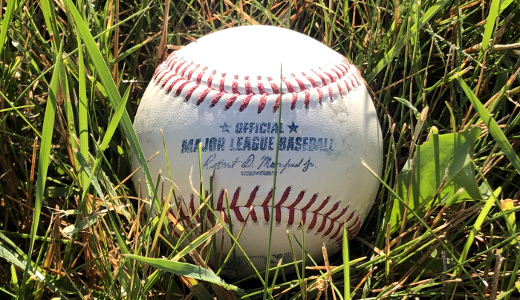
With professional baseball finally – well, at least as of this writing – starting to come back this year, I have been thinking more about it and other sports, especially how teams and the league are structured. In keeping with the mission here at The Hot Iron, my mind has been pondering how the business world could benefit from being more like professional sports.
Now before you the fair reader says, “hey, pro sports ARE businesses” let me elaborate. First, I concur, as you can’t have teams worth multi-billions and players making multi-millions and not be a business. Where I think they can be more alike, it’s certain aspects unique to sports that would be welcome and refreshing complements to the business world.
And now, ladies and gentlemen, here’s the starting line-up for my 5 ways I wish business was more like sports.
Minor leagues – When you get a job with a company, you are working right away. Some firms may have a training program, and many have a probationary period, but those are in place to get you up to speed and to fire you if need be, respectively. If you are new entering the workforce, say from school or perhaps not, or if you are switching careers, having a minor league system would be a great way to develop your skills and abilities, all the while actually producing.
By being in a minor league system in business, it’d be known that it is still the minors, and expectations would be somewhat different. Such differences could be in your pay and the cost of your services. When you are ready to perform at the top level, you would join the majors. If you never achieved that level, you could stay in the minors or maybe switch careers. In either case the minor leagues of business can be a place to develop the best and brightest people.
Free agency – Talk about the ultimate transparency, as everybody knows what an athlete makes and what the terms of their contracts are. What if that was the same in business, where it is completely the opposite and as non-transparent as one can imagine.
What you are worth to the marketplace would be well-known, and if your current employer couldn’t offer it to you, you could easily go elsewhere, being a free agent. Sure, being a contractor in today’s business environment is a close approximation, but the knowledge of who’s out there and available in any profession or discipline would not be as much of a mystery as it is now.
Working 162 days a year – That’s the number of games in a traditional Major League Baseball season, and other sports have fewer. When you are only working those days, it doesn’t mean you are idle the remainder of the year. When not in a game you are training, relaxing, recovering, getting physical therapy or even meditating.
What if the business work schedule allowed for you to have designated working days and designated training days, days in the middle of the week, and not just at night or the weekends? This way you can prepare better for your work time, ideally correlating to you being more productive and efficient.
No stigma to getting fired – When you get fired in business, it is a bad situation. How many people go around saying, “hey, I got fired?!” There are many reasons why people are fired, including lack of management oversight, new leaders or a change in direction in a company or group. Many times, it is simply personality conflicts. Or simply they could have made mistakes worthy of their termination. Getting fired doesn’t mean you don’t have the skills to do your job. That being said, you are not going to go out looking for a new job saying you were fired from your last one.
In sports, it’s the opposite. Players are getting cut all the time, and many times their unemployment is short as another team signs them. Coaches are getting fired all of the time, only to emerge wearing another team jacket the next season. In all cases it was well-known that the coaches or players were fired, yet nobody is shouting at them during a game because of what they did for their last team. Both players and coaches can perform poorly one season and thrive and win the very next one for a variety of reasons, such as the organization they go to has a much different culture or “system” which works better for them.
Spring Training – In business, an annual kickoff for the new year could be a weekend away for some senior leaders, but for the majority it is a meeting or, these days, a Webinar. What if business had a true spring training, as baseball does, where you get out of the normal office, get some training and bond with your co-workers, and plan and prepare for the upcoming calendar or fiscal year?
Deconstructing Business Being More Like Sports
The way sports have traditionally operated lends to the structure and elements as I have outlined here. As sports have evolved, players and coaches are “working” year round, just as a standard business does. I present here how I have imagined how business can leverage some of these elements from sports, and feel it could transform how businesses function and perform. Isn’t it worth a try to change business as usual?
This is from The Hot Iron, a journal on business and technology by Mike Maddaloni.
Did you enjoy this? Subscribe to The Hot Iron by RSS/XML feed or Read by Email
Business • Strategize • (2) Comments • PermalinkLearning To Code In the Early 1980s
By Mike Maddaloni on Thursday, June 04, 2020 at 11:47 PM with 0 comments
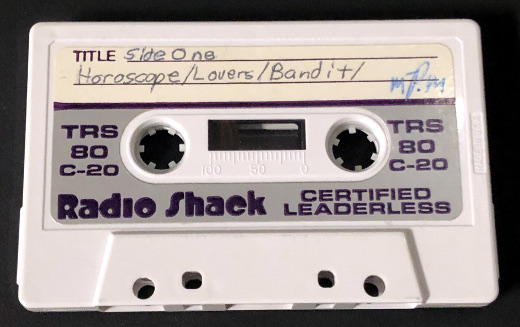
With all of the focus and attention these days on teaching kids about STEM (science, technology, engineering and math), it has triggered me in a positive way to recall when I myself learned how to write computer code back in the early 1980’s.
Now before you rush to judgement and say there is no comparison of the world today in 2020 to nearly 40 years ago, I’ll somewhat agree. The technology itself today is vastly different now than from then, however there are similarities in how I got started with computers and how my interest progressed.
Where It Began
This flashback is truly a journey, back in time and over many miles from where I am now. My junior high school in Massachusetts was the scene. One day in my math class, instead of getting to use basic-function calculators that were locked in a wooden case, 3 carts were wheeled in to the classroom with a Commodore PET computer on each of them. Little did I know how this would be the catalyst of my passion for technology.
Be aware the mobile smartphone you may be reading this post on has orders of magnitudes more power, memory and storage that all 3 of those PET computers combined. Let alone the fact the screens were monochrome (aka black and white) as compared to the rich colors in the palm of your hand. That being said, those computers with their cassette tape drives (we had no floppy disk drives then) had much more power than the calculators we usually got to use and we didn’t even realize the powerful tool that was put in front of us.
Tool, or should I say toy? All we usually did in math class with the computers was play games. Sure, the intent of these computers in the classroom was to expose us to the early-stages of the concept of personal computers, from typing commands to loading software from the cassette tape drive and running said software. Despite these “skills” we were learning, it wasn’t enough for me. I didn’t want to just play games as my classmates were content with, I wanted to write games!
Geek Quest
If I only had a picture of the face my teacher made when I asked her how to write software to program the PET computer. After her initial shock, she admitted she didn’t know, but there was another math teacher, Mr. Palmer, who she thought could help me. I didn’t have him for a teacher before and didn’t know him at all, and back then it was unusual to get such guidance or training from another teacher. But I wanted to learn how to write code, so I was connected with him by my teacher.
This unassuming introduction was a pivotal point in my life. And in middle school no less! Mr. Palmer proceeded to tell me the games and programs I was using on the PET were written in the BASIC programming language. He lent me a book on learning BASIC that he had, gave me some pointers and suggested I start reading this, and he would help me with any questions I had. He also said there were other books on BASIC and that other computers ran programs written in BASIC too, so I could look into those as well. Armed with this knowledge and direction, I was off and was writing my first BASIC programs by literally writing them with a pencil and paper. I did this at home or in study halls, and then when I got time in front of the computer, I would type them into the computer and save them to a cassette. The photo above in this post is of one of the cassettes I recently rediscovered from those days.
This geek quest was a solo one, however, as I was the only kid in class who wanted to write code. When it came time to use the computers in math class, of the 3 computers I would always get one to myself. Some kids complained, but overall they didn’t seem to care as long as they got a chance to play games in class.
What’s Your Sign?
My first programs were short ones that didn’t do a whole lot – clear the screen, scroll text, basic math – and I wanted to do more. The idea came from somewhere (sorry, I don’t recall all of the details of this time!) to write a program that would tell your horoscope. So I came up with a simple premise, you type in your astrological sign, spelling it exactly (even Sagittarius), and a preset silly horoscope for you would be displayed on the screen. If you know anything about programming languages, it was a giant If-Then-Else statement. But it was my If-Then-Else statement.
After some toil and testing, the program was done. I showed it to Mr. Palmer and he liked it, so I then let my math classmates give it a try. For as simple as it was, some of them were actually impressed that I was able to create such a program. And with this, I wrote the first of many, many computer programs I would over the next decades.
To Infinite Loop And Beyond
From this humble beginning, I learned more “advanced” features of the BASIC language. As I moved into high school I had access to the school’s mainframe, a Digital PDP-11, as well as eventually my own computer at home, a TRS-80 Model III. With these 2 platforms my learning took off, exploring more complex aspects of programming, the hardware of the computers and my first foray into going “online” with dial-up computer bulletin boards. Along the way I also had my first computer consulting gig in high school. Next came college and a degree in Computer Information Systems, and the career I have talked about much here in this blog.
Deconstructing Learning to Code
In the beginning of working with computers I had a mentor who guided and encouraged me – thank you Mr. Palmer, wherever you are! Over the years and many miles from the junior high school, it’s nice to reminisce about those exciting early days of computing and the enthusiasm I have had for technology. This guidance was important for me then, just as it is critical for young people today to also be inspired in a career in high technology.
This is from The Hot Iron, a journal on business and technology by Mike Maddaloni.
Did you enjoy this? Subscribe to The Hot Iron by RSS/XML feed or Read by Email
Build • Strategize • Technology • (0) Comments • PermalinkSay Disaster Recovery Again
By Mike Maddaloni on Monday, May 11, 2020 at 05:55 PM with 0 comments
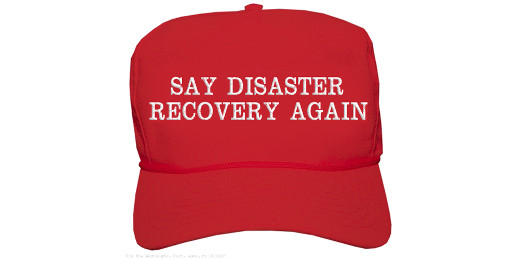
At some point we switched from saying "disaster recovery" to "business continuity," and I think it's time to switch it back.
Perhaps it started in the 1990's when a wave of buzzwords and political correctness came into vogue. The phrase “disaster recovery” has such a harsh tone to it, where “business continuity” is so much more positive, isn't it? Positive, sure, but did losing the edge of the phrase diminish the need for how we often apply it, in creating a disaster recovery plan?
Disaster recovery planning is creating an action plan and related activities in preparation for a disaster in one’s life. It is typically something a business does, but individuals and families can prepare one as well.
By calling it recovery rather than continuity, we have a sense of urgency and a goal of pushing forward, wherever it takes us. Continuity implies we will still be the same afterwards, where as we are living now that may not completely be the case. By using the term disaster rather than business, it means it impacts all of us, not just businesses. Individuals, families and related organizations all need a disaster recovery plan and to be included in a business’ plan too, including the resources to execute on that plan, and I’m referring to more than pallets of toilet paper. The contents of a plan would be different based on a focus of more creative options.
The onset of a pandemic on a free-market, capitalistic society has been devastating. Now in the third calendar month of it, we are seeing daily reports of businesses - not just small businesses but large ones too - filing bankruptcy or closing altogether. This is on top of record layoffs and furloughs leading to record unemployment claims. The "disaster" today is not just with companies but with people as well. Many of both were not prepared or prepared to the degree they needed to be.
So what do you think? I welcome your thoughts in the comments to this post.
Deconstructing Disaster Recovery
Words matter. By softening them it may pease some people, but it could also be detrimental to the goal of using those words. Disaster recovery says there was something bad, and we are going to come back from it. This phrase - and goal - is what we need right about now.
Image of cap generated from The Washington Post
This is from The Hot Iron, a journal on business and technology by Mike Maddaloni.
Did you enjoy this? Subscribe to The Hot Iron by RSS/XML feed or Read by Email
Business • Strategize • Thrive • (0) Comments • PermalinkMy Brown Bag Lunch Presentation On Web Accessibility
By Mike Maddaloni on Tuesday, April 28, 2020 at 10:44 PM with 0 comments
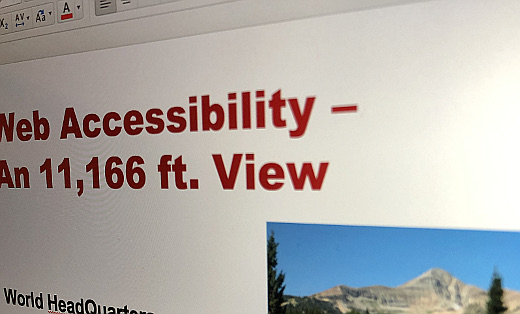
Recently I gave a “brown bag lunch” presentation on Web Accessibility. For those not familiar with the term, it refers to an informal business gathering at lunchtime where everyone brings their own lunch (thus the reference to brown bag) and one person gives a short presentation followed by a discussion as everyone eats their meal. I have participated in and presented at many of these over the years and they are a fun, casual way to learn and connect with your team.
The audience for this were fellow members of World HeadQuarters, a co-working space in Appleton I joined a few months back. In this case, the presentation was virtual as the space is not open these days. That being said, it was as close as you can get to the in-person experience with about a half dozen online participants.
A Broad Topic In Short Time
How do you talk about Web Accessibility in about 10 minutes, and to an audience that this may be completely new to them? This was my challenge, and I gladly accepted it. I decided to keep it at a high level, not getting into too much jargon while giving the audience information and takeaways for them to explore more on their own.
I’d like to share my presentation here. While there is no recording of me actually giving it, the slides I prepared provide the essentials. The slides are embedded below for viewing from SlideShare, and you can access a PDF of it here.
I welcome any feedback, as well as if this was useful to you. As I look back in on it, I can think of changes and refinements to it, like anything you review after the fact. It was also a great opportunity for me to keep my presentation skills sharp.
This is from The Hot Iron, a journal on business and technology by Mike Maddaloni.
Did you enjoy this? Subscribe to The Hot Iron by RSS/XML feed or Read by Email
Strategize • Web Design • Web Development • (0) Comments • PermalinkSubscribe to The Hot Iron



The Hot Iron strives to present unique content and point-of-view on business, technology and other topics by Mike Maddaloni, a technology strategist based in Appleton, Wisconsin.
Photo credit: Logan Connor/Oomphotography
Value for Value
If you like what you are reading on The Hot Iron, buy me a coffee!
About Links
In posts here at The Hot Iron there are often links and banner ads for products and services. For some of these links and banner ads, I receive compensation if you click and/or eventually buy said products or services. Where most links are marked as such, it is safe to assume any link or banner ad is a compensated one.