
My Project Graveyard
By Mike Maddaloni on Tuesday, January 19, 2021 at 08:33 PM with 0 comments
One thing that drove me to work on the Web, gladly leaving behind a career of mainframe and client-server systems behind me, was the ability to create highly visible applications and projects that could be easily shared and used by the masses. Armed with this skillset, it was easy for me to imagine a system from any random idea that came to mind. If I had the proverbial nickel for every idea I had, I would be too busy sunning myself on a tropical beach to be writing what I am right now.
Along the way I actually executed on some of my project ideas, one being the very blog you are reading. The others, well, came to an unfortunate but necessary demise. Though I have written about some of these in the past, I haven’t brought them together until now, in My Project Graveyard. Inspired by similar collections by others, I am sharing projects that started with good intentions, and ended for various reasons.
Phenom – This was my personal Web site and the first I created using a domain name. Though I created my first personal Web site as early as 1993, it was using the domain name of the combined dial-up Internet / shared Web hosting providers. In 1996, I registered my first domain name – monehp.com. Why that? It is “phenom” spelled backwards. Again you are likely asking, why that? I sent out an email to the few dozen people I knew who had email back then asking them to help suggest a domain name for me. Two people came up with this one – my license plate on my car then was PHENOM, which was a take on my college radio show, the Madman Phenomenon, from the late 1980’s. Why did I call my radio show that? Now that I don’t completely remember.
This site was also my first development sandbox where I tried several ideas, including a surfing Web site where my friend RJ provided the content (trust me, I am no surfer!). It was also the first home of what became GoPats.com. The Wayback Machine at archive.org has the oldest record of what was on the site going back to 1997. I maintained this site until better homes for my projects came along. I kept it as a separate site for about 10 years, then I set the domain name, which I still own, to redirect here to The Hot Iron.
GoPats.com – This site, as mentioned above, started as a sub-site of Phenom, that I initially called it Patriots Unofficial. It then took on a life of its own within a year with its own domain name (complete credit to my friend Clint, who wrote a weekly column for the site, for the idea to register it) and went on for another 21 years, until it was “retired” which means the site wasn’t updated for years and it was time to move on. During its run not only did it serve Patriots fans but myself as well as it was a showcase of the type of Web development work I could do.
I wrote a fairly complete story about GoPats.com a few years ago and the domain name now redirects to that blog post.
Boston Jaycees – This was the first Web site I built for a greater cause. I got involved with the Jaycees (also known as Junior Chamber outside of the US) and, recognizing they didn’t have a Web site, I offered to build one. It was also the first time I worked with someone who is now referred to as a digital marketing professional; it was another Jaycees member who worked for an ad agency who was developing a digital practice.
The site evolved both as my technical skills did, along with higher user expectations as more people were using the Web. What started as a “static” site – one that had to be hand-coded – evolved to one “dynamic” – one that had what is now called a content management system or CMS. A lot of the functionality was similar to what I built for GoPats.com, and often I would design elements to be used across many of my sites. At the point I became president of the chapter, I handed the reigns of the site to another emerging digital marketing guru John Wall, who discontinued the paper newsletter we had and evolved the Web site even more.
Within a few years of leaving the organization and the Boston area, the site went dark as the chapter ceased operations. For a time I “rescued” the domain name but eventually I dropped it. For another time it was pointing to the last Jaycees chapter in Massachusetts, but now it is once again available for registration. You can see the last version of the Boston Jaycees Web site as I had built it here.
Control – In the course of running my former Web consulting business, I was tracking more and more information, from domain names to project elements to billable time and everything else I could possibly track. I was fairly organized with multiple spreadsheets, but over time they became too much to manage. I then decided to build an application to manage it all, and I aptly called it Control.
I don’t want to brag too much, but I was able to easily manage and control all of items I needed to with this platform. I even impressed myself when I brought on a bookkeeper at one point, and with creating a few simple reports she was able to generate invoices rather easily using the system. When I decided to shutter the business and return to the working world, this application was shut down as well.
tasklogr – When I first heard of Twitter I wasn’t immediately drawn to using it, but the idea of a short-messaging system did inspire me in how I keep track of bits of information, as I wrote about back in the day. That inspiration led to me creating tasklogr, a system of capturing short messages. The interface to enter these messages was Web pages – one that was a top bar frame on my browser’s home page, and another that would fit nicely on a mobile device. Notes I entered were captured within my Control system, and from there I could manage a straight task list or convert to other actionable information for my business.
This solution served me well for a while, but eventually I found other note-taking apps like BugMe that I still use to this day.
GoPats.com Report – Bitten by the podcasting bug, I decided I wanted to create one. But about what? That question seemed to be the only thing I should be concerned with creating a podcast. Little did I know how wrong I would be.
I came up with the idea for a podcast on the New England Patriots, an audio companion to GoPats.com. As both my own and my friend Clint’s activity on the site had been waning, I thought this would be a good way to breathe life into it. There I go thinking again. The podcast lasted exactly 1 episode. In short, it took too much work for me to edit and produce it, and in the end wasn’t something I was interested in doing on a regular basis.
Flagship CMS – As I mentioned earlier, I was developing code for GoPats.com and the Boston Jaycees Web site, and in some cases leveraging code from one for the other. This came in handy as I grew my Web consulting business and I used this code as the foundation for the CMS for client sites. This worked well for many years, and I eventually gave these tools a name – Flagship CMS. This was solely an internal name and I never really developed it as a branded product. The timing of the name was actually at the tail-end of using it as I was pivoting to commercial CMS applications for sites. This decision was based on many factors, including the proliferation of such tools in addition to reevaluating where I should focus my time on. Eventually all of the sites running Flagship CMS were taken over by others firms who deployed their own technical solution to the Web sites, which coincided with the winding down of my former business.
Looptopia Memories – In 2007 and 2008 a weekend arts festival in the Chicago Loop called Looptopia took place. At the time I was living in the Loop and decided to create a Web site about it, featuring photos and videos from the event. All of that content was uploaded to Flickr, with whom I have since deleted my account. Where I kept the Web site around for a few years I didn’t update it much. The last state of Looptopia Memories can be seen here.
sourcegate – As any good technician should I keep notes of code, services, procedures, etc. that I have used or think I would use at some point. And lots of them. Like any burgeoning collection of information, it needs to be managed to be effective. After several systems didn’t quite do the job I decided to try a public blog, where each item would be its own post. That way I would not only be curating the information but sharing it with the greater community. Eventually I decided to shutdown this additional blog as I wasn’t actually referencing much of the information I was posting. An early version of this tech tips blog can be seen here.
What’s interesting is the domain name I gave the site – sourcegate.com. I acquired the domain name several years after I worked for SourceGate Systems, a dot-com start-up in the Boston area. I had placed the name with a backorder domain name system and eventually the name was available and I was able to register it. At this point I have owned the domain name longer than the company was in existence, and certainly longer than the six months, five days I worked there.
psURL – This one isn’t as much a site demise as one reimagined. I decided to build my own short URL service, one where I could take a ginormous URL and have a short one that I could easily pass along in a message or even speak it for someone to easily remember and access. For example, https://psurl.com/mike links you to a longer URL for a PDF of my resume.
Using Flagship CMS as a base, I built my own system. As an addon I built the ability for a short URL to display a Web page with a text message on it. There were similar services out there like this that were inspired by the desire to workaround the then-120 character limit of a tweet on Twitter. Several years after I built this I found YOURLS an open source short URL application, and decided to move to that. Where I liked the Twitter workaround, I didn’t really use it much, and in its place I gained a system I didn’t have to maintain much at all.
dMorning – This is one that is out there, lost, wandering around the streets of northeast Wisconsin. After moving here a few years ago and not finding a tech/creative networking venue, I decided to create one, and called it dMorning. Well, I tried to at least. For some reason it never took off, and I tried twice to do so. The Web site is still out there in hopes that a third time is the charm. Though it will have to wait until in-person network resumes in general. What does the name mean you ask? Look at the dMorning site to find out.
Domain Names – Ah, domain names. I never kept a log of all of the domain names I no longer own. Most of them I simply dropped by not renewing them, and a few I sold off over the years. I would likely have to irritate my friends at Name.com for a history of all of the domain names I once registered with them. The fact that I don’t have that exhaustive list is probably a good thing, as I am guessing it would be rather long and a reminder of many, many more fleeting ideas.
Deconstructing My Project Graveyard
There’s a saying in business today to “fail fast” whereby we move on quickly from something that different work. Where I basically agree with this, we must also recognize the good and bad from these failings or things we simply decided to no longer do. Burying them in a project graveyard is a good way to acknowledge them, and move on to the next big thing.
This is from The Hot Iron, a journal on business and technology by Mike Maddaloni.
Did you enjoy this? Subscribe to The Hot Iron by RSS/XML feed or Read by Email
Business • Technology • (0) Comments • PermalinkRemove LinkedIn Connections Without Them Knowing
By Mike Maddaloni on Wednesday, October 28, 2020 at 09:33 PM with 0 comments
Recently I got an alert on LinkedIn that someone viewed my profile. I knew who this person was as they were a connection. Well, I thought they were one, for when I looked at their profile we were no longer connected. My guess was they viewed my profile solely for the purpose to remove the connection between us, and yes, as you may guess there’s a long story here that I will purposely not share.
What this person didn’t realize, and many others do not as well, is that you can remove someone as a connection on the business social networking site without them even knowing it. It is not completely obvious that you can do so, however. As I have known about it for years and maybe even did it once or twice myself, I will share my stealth disconnect secret in the wide open here.
The Steps to Disconnect
Here’s the steps to remove a LinkedIn connection using a standard desktop/laptop Web browser.
1. Navigate to LinkedIn.com, select My Network in the top navigation bar, then under Manage my network click on Connections.
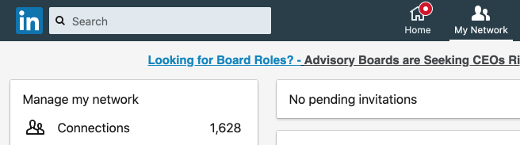
2. Search and scroll, but do not click – the key here is to not open someone’s profile, rather scroll to it in the list of connections. You can try entering a partial name to search, but do not click on their name. If you’re unsure, simply scroll to the bottom of your connections, which may take a while, then use Ctrl-F (on the PC) or Command-F (on the Mac) to find the name of the contact.
For this exercise, I chose my friend and long-time The Hot Iron reader Gary. Don’t worry, I won’t actually disconnect from you!

3. Click the ellipsis (the 3 dots) to the far right of their entry on the list, which will display the option to Remove connection, and click it.
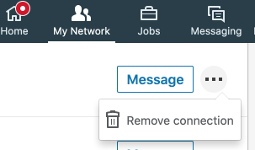
4. You will be presented with a pop-up to confirm to Remove Connection. As the message says, they won’t know that you did. Click Remove to proceed, or Cancel if you don’t want to, as I did.
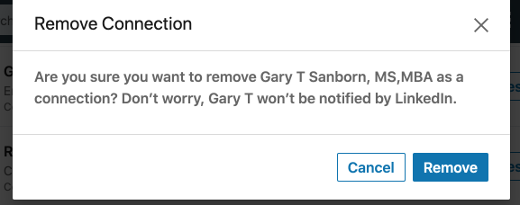
You will receive a confirmation message when complete, and your connection count will be one less.
To Remove or To Not Remove Connections
This is not the first time I talked about removing LinkedIn connections, as it first came up for me over 8 years ago in this post on how I removed them then. As you may guess, the functional process is much different now. But in re-reading this original post (and adding an editor’s note on its now-outdated content) the reasons for removing connection remain the same, both in what I stated as well as comments to the post. Nothing is forever, as I mentioned in that post, and it certainly holds today. Even the “wise man” who told me is someone I haven’t spoken to in years.
Deconstructing Removing LinkedIn Connections
Removing connections on any social network is a reality. However it’s good to know you have options on how to do it, especially if you don’t want the other person to know you have made a disconnect.This is from The Hot Iron, a journal on business and technology by Mike Maddaloni.
Did you enjoy this? Subscribe to The Hot Iron by RSS/XML feed or Read by Email
Business • Strategize • Technology • (0) Comments • PermalinkConnecting With A Colleague
By Mike Maddaloni on Thursday, October 15, 2020 at 05:45 PM with 0 comments
In today’s remote working environment, often we struggle to connect with people we work with who are also in the same boat. However we soon forget that when we were working in the same office and sitting around the same table with these same people, we still had this problem. I had a challenge like to this once with a teammate that I, as well as others, hadn't really connected with. I decided to make the extra effort to bridge the gap with this person, all to a successful outcome.
At the time I was with an international firm on an international project based in Boston. On the project was a mix of people from the Boston area, around the US and a few from around the world. One in particular was from Australia. When he came into the office, his presence was known. He dressed a little differently from the rest of us had a certain swagger. Not to forget he had a unique accent. None of this really mattered to me, and I introduced myself to him and told him I looked forward to working with him. Despite this initial outreach, I wasn’t really sure he felt the same towards me.
Often this colleague and I were in the same meetings, representing our teams on the project. I learned quickly he didn’t mix words and would speak honestly, though not always the most appropriately, at least by American standards. Often he would mix colloquial terms from Australia into work discussions, causing people to scratch their heads. As a result, many people focused on how he was saying something rather than what he was saying.
I looked at this situation differently. Here was someone who had come from another part of the world and was now stationed in Boston; though Boston is a very international and cosmopolitan, it still harken back to its conservative colonial roots. He came into this ever-expanding group and was trying to make a name for himself.
A Literally Off The Shelf Solution
One day I looked ahead and saw I was scheduled to be in a meeting with him the next. That night I was thinking of how I could finally break the ice with him. As I looked around my home office I found the answer sitting on my bookshelf. The next day I brought it in to work, a book of Australian slang. It was given to me years earlier by another colleague from Australia. It was a rather thick book, the size of large novel. Even though I had held onto it for years, I never thought it would come in handy in this capacity.
As we gathered the next day in a conference room, I sat directly across from my colleague from Down Under. Just as a meeting started, I looked across the table at him and taking the book out, I slammed it on the middle of the table. As did, I said something to the effect that he wasn’t going to get away with using any Australian slang expressions on me any longer.
To this he was a at first taken aback, then he looked straight at me and smiled. From that point forward, we had a much better working relationship, and I got to know him more personally as well. It all happened because I was simply willing to work to make a connection with him.
Deconstructing Connecting with Colleagues
Every situation is different and sometimes we don't always get it right. When it comes to personalities, I feel it's definitely worth trying to connect with people. Many times just from that effort we can gain appreciation and for each other and work well together.
This is from The Hot Iron, a journal on business and technology by Mike Maddaloni.
Did you enjoy this? Subscribe to The Hot Iron by RSS/XML feed or Read by Email
Business • Strategize • (0) Comments • Permalink7 Vital Web Site Updates For The Pandemic
By Mike Maddaloni on Tuesday, August 11, 2020 at 09:49 PM with 2 comments

As businesses and individuals return to work, of equal importance to safety and protection is communications – we need to know as much as possible to make informed decisions. One area I have found lacking is with the Web sites of businesses and professionals. Many sites I see in the course of trying to return to normal suffer from a dearth of vital information needed for people to determine if they are still operating or not, and if so how.
Here I offer seven recommendations for your Web site to indicate the status of your business and how to help return to normal as possible these days.
Add alert functionality upfront – If there’s something important you want people to know, put it right up front. How? You can have a brightly colored alert banner anchored to the top of your home or all Web pages to inform people. A browser pop-up can also achieve this. As you may not have this functionality already, you might have to check with your Web site consultant or look into the services of your Web site platform to see how you can gain this. It may be easier than you think, and even if it comes with a cost, it will be well worth it.
Are you open? – This may be obvious to you the business owner, but not all Web sites I visit make it clear. The messaging may be nested into the design of the site but not easily found. Using the alert functionality mentioned above is one way to achieve this. Another is to look at all of the content of your site and make whatever adjustments needed to indicate so.
Update location, hours and contacts – Due to changes in your business, have you relocated? Did you change your hours? Do you have different contact information? Is this new information reflected on your Web site? If not, it should be.
Changes to your business practices – If the experience your customers will have with you has changed as a result of COVID-19, indicate this on your Web site. Will someone have to wear a mask? Do you have shielding in place? Is distancing required? This is important for people to understand if they can still do business with you and will give them the peace of mind they may need that it's safe to do business with you.
Add social media feeds to your site – Many businesses and individuals are updating their social media accounts more than their Web site. Why not kill two birds with one stone and put the feeds from your social media accounts onto your home page? How to do this varies depending on your site and you should follow the previous tips on checking your Web site provider or consultant.
Start an email list – Many businesses found out the hard way when they had to shut down that the only contact with their customers was when they came through their door. As my good friend John Wall says on his Marketing Over Coffee podcast, you've got to have a house list. Every business, every professional should have an email list with the sign up on the Web. There are many different services where you can set up a mailing list, some are even free. For example, if you are reading this by email, I use MailChimp in order to create and send the emails from my RSS feed. You can customize templates and the content to send to your customers and contacts.
Add e-commerce – There's no time like the present to take online payments or sell products and services online. Just last week, Chipotle just started doing this by selling clothing and other items online. Now the company that was all about selling burritos and bowls is now into merchandising. If you don't have a specific new product idea, simply having the ability to take credit cards is important. It can be as simple as setting up a PayPal account and pay by the transaction by transaction, then upgrade to a credit card service when you get more volume.
Deconstructing vital Web site updates
As social media and other services have evolved, much business content and functionality, even e-commerce, uses them. Your Web site may have been neglected or completely out of sync with other messaging you have out there. As Coronavirus remains out there, I recommend these vital Web site updates to ensure it remains an integral part of your business.
This is from The Hot Iron, a journal on business and technology by Mike Maddaloni.
Did you enjoy this? Subscribe to The Hot Iron by RSS/XML feed or Read by Email
Business • Strategize • Web Design • (2) Comments • Permalink5 Ways I Wish Business Was More Like Sports
By Mike Maddaloni on Thursday, July 30, 2020 at 07:17 PM with 2 comments
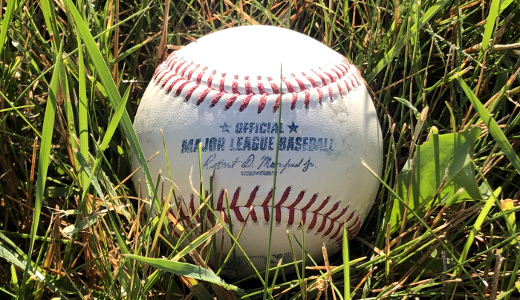
With professional baseball finally – well, at least as of this writing – starting to come back this year, I have been thinking more about it and other sports, especially how teams and the league are structured. In keeping with the mission here at The Hot Iron, my mind has been pondering how the business world could benefit from being more like professional sports.
Now before you the fair reader says, “hey, pro sports ARE businesses” let me elaborate. First, I concur, as you can’t have teams worth multi-billions and players making multi-millions and not be a business. Where I think they can be more alike, it’s certain aspects unique to sports that would be welcome and refreshing complements to the business world.
And now, ladies and gentlemen, here’s the starting line-up for my 5 ways I wish business was more like sports.
Minor leagues – When you get a job with a company, you are working right away. Some firms may have a training program, and many have a probationary period, but those are in place to get you up to speed and to fire you if need be, respectively. If you are new entering the workforce, say from school or perhaps not, or if you are switching careers, having a minor league system would be a great way to develop your skills and abilities, all the while actually producing.
By being in a minor league system in business, it’d be known that it is still the minors, and expectations would be somewhat different. Such differences could be in your pay and the cost of your services. When you are ready to perform at the top level, you would join the majors. If you never achieved that level, you could stay in the minors or maybe switch careers. In either case the minor leagues of business can be a place to develop the best and brightest people.
Free agency – Talk about the ultimate transparency, as everybody knows what an athlete makes and what the terms of their contracts are. What if that was the same in business, where it is completely the opposite and as non-transparent as one can imagine.
What you are worth to the marketplace would be well-known, and if your current employer couldn’t offer it to you, you could easily go elsewhere, being a free agent. Sure, being a contractor in today’s business environment is a close approximation, but the knowledge of who’s out there and available in any profession or discipline would not be as much of a mystery as it is now.
Working 162 days a year – That’s the number of games in a traditional Major League Baseball season, and other sports have fewer. When you are only working those days, it doesn’t mean you are idle the remainder of the year. When not in a game you are training, relaxing, recovering, getting physical therapy or even meditating.
What if the business work schedule allowed for you to have designated working days and designated training days, days in the middle of the week, and not just at night or the weekends? This way you can prepare better for your work time, ideally correlating to you being more productive and efficient.
No stigma to getting fired – When you get fired in business, it is a bad situation. How many people go around saying, “hey, I got fired?!” There are many reasons why people are fired, including lack of management oversight, new leaders or a change in direction in a company or group. Many times, it is simply personality conflicts. Or simply they could have made mistakes worthy of their termination. Getting fired doesn’t mean you don’t have the skills to do your job. That being said, you are not going to go out looking for a new job saying you were fired from your last one.
In sports, it’s the opposite. Players are getting cut all the time, and many times their unemployment is short as another team signs them. Coaches are getting fired all of the time, only to emerge wearing another team jacket the next season. In all cases it was well-known that the coaches or players were fired, yet nobody is shouting at them during a game because of what they did for their last team. Both players and coaches can perform poorly one season and thrive and win the very next one for a variety of reasons, such as the organization they go to has a much different culture or “system” which works better for them.
Spring Training – In business, an annual kickoff for the new year could be a weekend away for some senior leaders, but for the majority it is a meeting or, these days, a Webinar. What if business had a true spring training, as baseball does, where you get out of the normal office, get some training and bond with your co-workers, and plan and prepare for the upcoming calendar or fiscal year?
Deconstructing Business Being More Like Sports
The way sports have traditionally operated lends to the structure and elements as I have outlined here. As sports have evolved, players and coaches are “working” year round, just as a standard business does. I present here how I have imagined how business can leverage some of these elements from sports, and feel it could transform how businesses function and perform. Isn’t it worth a try to change business as usual?
This is from The Hot Iron, a journal on business and technology by Mike Maddaloni.
Did you enjoy this? Subscribe to The Hot Iron by RSS/XML feed or Read by Email
Business • Strategize • (2) Comments • PermalinkSubscribe to The Hot Iron



The Hot Iron strives to present unique content and point-of-view on business, technology and other topics by Mike Maddaloni, a technology strategist based in Appleton, Wisconsin.
Photo credit: Logan Connor/Oomphotography
Value for Value
If you like what you are reading on The Hot Iron, buy me a coffee!
About Links
In posts here at The Hot Iron there are often links and banner ads for products and services. For some of these links and banner ads, I receive compensation if you click and/or eventually buy said products or services. Where most links are marked as such, it is safe to assume any link or banner ad is a compensated one.