
iGoogle Shutdown And The Demise Of The Personal Home Page
By Mike Maddaloni on Friday, August 24, 2012 at 04:17 PM with 12 comments
A few weeks ago while going thru my morning routine of catching up on email and news, I noticed something on one of my sources for information, iGoogle, which is Google’s home page product. A box appeared in the header banner as shown below:
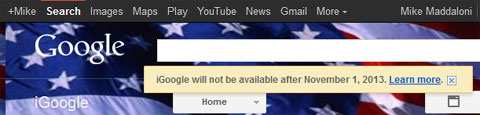
The message states, “iGoogle will not be available after November 1, 2013. Learn more.” Upon clicking the link to learn more about this, which you can view at this link, I read the following short message which I am repeating below.
What's happening to iGoogle?
iGoogle will be retired in 16 months, on November 1, 2013. The mobile version will be retired on July 31, 2012.
How did you come to this decision?
We originally launched iGoogle in 2005 before anyone could fully imagine the ways that today's web and mobile apps would put personalized, real-time information at your fingertips. With modern apps that run on platforms like Chrome and Android, the need for something like iGoogle has eroded over time, so we’ll be winding down iGoogle on November 1, 2013, giving you a full 16 months to adjust or easily export your iGoogle data.What will happen to the data stored in my gadgets?
All of your personal data stored in other Google products will continue to be available via those products, including Gmail, Google Calendar, Google Finance, Google Docs (now Google Drive), Google Bookmarks, and Google Tasks. Other gadgets, like the to-do list, allow you to export your data - look for the “Download all” option under the drop-down menu tied to the title of your list. Most iGoogle gadgets are created and maintained by third-party developers. If you’d like to export your data, you should contact the gadget creator directly.I really like iGoogle -- are there any other alternatives?
On your mobile device, Google Play offers applications ranging from games to news readers to home screen widgets.If you’re a fan of Google Chrome, the Chrome Web Store provides a similar range of options like productivity tools and applications to check the weather. In addition, just like iGoogle, you can personalize Chrome with a theme.
Following the Google Product Playbook
This decision by Google, while not initially welcome by me, is not all surprising either. Google is a company that encourages its employees to work on side projects and some of them have become products or services they have publicly offered. However, they have also been quick to shutdown non-performing services or those which don’t have an enormous impact on the enormous company. Compound all of this with their practice of buying companies for people or pieces of their technology then shutting them down, and this move to end iGoogle is in line with how they play – and win - the game on a daily basis.
After reading this short but to the point support document, I had to agree with them – the marketplace has changed, not to mention the types of devices people use. The large-format Web browser home page isn’t as popular as it used to be, especially with mobile and tablet devices, and I have to add myself into that category of someone looking elsewhere for content, as I did say above iGoogle was only “one” place I looked for information.
Say Goodbye To The Web Browser Personalized Home Page
I will go out on a limb and say this is the first of many rings of the death knell for this format of information delivery. The originator of this, Yahoo, is in a new reign of leadership with Marissa Mayer, who after joining them from Google probably has some insight into the business model of this type of product. There are also fewer services out there offering this, as I talked about several years ago when I lamented at the lack of innovation from MyWay.com which looks the same as the last time I saw it back in 2008. I predict the personalized home page sector will end within the next few years.
The idea of the portal home page today may work within a company, but for those of us on the go or using multiple hardware devices – from notebooks to phones to tablets to whatever is next – having one source is a good idea, but it is also easy enough to configure widgets on a smartphone screen to show links or feeds or email messages. But with so much choice for consumers, the ability to get the weather, stock quotes and sports scores easily trumps the desire to get them from one single source, especially when there really isn’t one true cross-platform choice.
It’s been real, and it’s been fun, but it’s time to move on from the personalized home page to the next new thing, whatever that may be. I don’t know for sure, but I will write about it when I come up with it!
RSS To The Rescue
 As I said I get my news and information from multiple sources, and their common denominator is RSS, or Real Simple Syndication. If you have ever seen the orange icon to the right, then the content on that Web page can be “aggregated” with other content which offers this same ability using RSS aggregator and subscribing to the “feed” of the content. I use Fever, an extremely robust commercial self-hosted RSS aggregator application by Shaun Inman. Fever replaced Google Reader for me, as I didn’t want the search giant knowing everything I read! There are other feed aggregators out there, including most Web browsers as well as mobile apps.
With Fever, I subscribe to over 200 feeds across all categories, from personal to business and beyond. There is no way I can read everything, and typically scan the headlines to get the gist of what is happening, clicking the occasional article for depth on a topic. I am always trying feeds from media outlets, companies, associations and bloggers, in some cases dropping other feeds when I find a new or better one to replace it. Where it’s not the same layout for me, it brings the content together and I can still pick and choose what to scan and what to read.
So do you agree with me, is the personal home page dead? Do you use iGoogle and will you miss it? Or simply how do you keep up with news and information on the go? I welcome your thoughts in the comments below.
Did you enjoy this? Subscribe to The Hot Iron by RSS/XML feed or Read by Email.


This is from The Hot Iron, a journal on business and technology by Mike Maddaloni, Founder and President of Web consulting firm Dunkirk Systems, LLC.
Business • Mobile Technology • Strategize • Technology • (12) Comments • Permalink
Dunkirk Systems, LLC Shutting Down Its Facebook Page
By Mike Maddaloni on Sunday, July 08, 2012 at 11:11 PM with 7 comments
At Dunkirk Systems, LLC we have decided to shutdown our Facebook page. We have recently changed our photo and cover to the following image and will shut it down within the next week.

Why are we doing this? After much thought, many reasons surfaced which led to this decision. The following is what I posted on the page.
Hello:
Thank you for your “like” and support of Dunkirk Systems, LLC. We have decided to shutdown our Facebook page and will do so within the week. As someone who has expressed interest in us in the past, we wanted to let you know this and the reasoning behind it.
Like many businesses, when Facebook started allowing business pages we created one. And like many businesses we did not have a plan for this. As much as we have consulted our clients on social media, we followed the cliché of the cobbler’s kids having the worst shoes and did not put in place and execute a plan for managing the site. So there it sat.
As we are continuously rethinking our business, this page came to the forefront. As a B2B business, we are not reaching out to consumers. We have never received business through the page, and as we look forward we do not see this as a place to solicit business. We also do not have the continuous volume of original content that will allow Dunkirk to be omnipresent in the changing timeline structure of Facebook. And we would not be thorough without taking into consideration our general concern for privacy and security which are frequently coming to the surface within the Facebook walled-garden ecosystem.
There are other ways to keep up with Dunkirk and get in touch with us, including Twitter @dunkirk, our Web site at DunkirkSystems.com and my blog, TheHotIron.com. We of course welcome your thoughts and opinion on this, and as the page is going away feel free to comment on it on the accompanying blog post at TheHotIron.com.
Regards,
Mike Maddaloni
Founder and President, Dunkirk Systems, LLC
What do you think? Am I crazy, spot on, or do you even care? Your comments are very welcome.
Did you enjoy this? Subscribe to The Hot Iron by RSS/XML feed or Read by Email.
This is from The Hot Iron, a journal on business and technology by Mike Maddaloni, Founder and President of Web consulting firm Dunkirk Systems, LLC.
Announcements • Business • Social Media • Strategize • (7) Comments • Permalink
Thoughts On Removing LinkedIn Connections
By Mike Maddaloni on Monday, May 14, 2012 at 06:00 AM with 3 comments
Editor's Note: This post has been edited to remove links that are no longer valid. A more recent post as of December 2020 explains the newer way to remove connections.
Have you ever removed someone as a LinkedIn connection?
The thought came to mind recently as a former colleague came to mind, and when I went into LinkedIn to look up their profile to see where they were working, I saw they were no longer a connection. Not only did they cut ties with me, but several other colleagues who I would go as far as saying were part of a circle of friends. Yes, there was some falling out there, but nothing anyone else would care about!
You Can Remove Someone as a Connection?
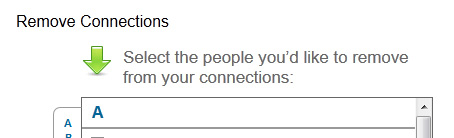
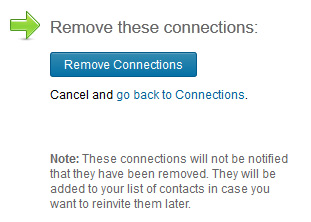 Yes, you can remove LinkedIn connections. I know this as I have removed a grand total of 2 people as connections over the years. You have to go out of your way to do so, and I found the link to remove connections through the LinkedIn Help Center. There is no remove link on a profile page similar to the unfriend or unlike options on Facebook. In the image above you can choose from all of your contacts who you want to remove, and as the second image says, it adds those removed connections to your contacts. Many people of course don’t know they have a contacts list either – if you ever sent a connection request and they did not respond, you can find those people there.
Why Would You Do That?
As a wise man once told me, nothing is forever. The 2 people I removed as contacts were a married couple (and they still may be) and I used to work with one of them. I did some Web consulting for the other, and in short, both of them treated me like dirt. I was so appalled at the experience that I never spoke with either of them again, and subsequently removed them as connections. Interestingly, LinkedIn kept the recommendation one of them gave me for when we worked together – it is still hidden, and there is no way of removing it.
As the whole idea of LinkedIn is business connections, ideally you’d want to keep them. I have over 700 connections (or as LinkedIn calls it, 500+) and most of them are people I know of recall. There are a good number whom I don’t though, and would have to rack my brain to figure who they are. That being said, I don’t have any reason to remove them as a connection.
My philosophy for managing LinkedIn connections differs from how I manage the people I am connected with across other social media platforms. As I use Facebook for personal and not for business, I have unfriended people who are purely business contacts over the years. Though I have recently signed up for BranchOut as a Facebook app, the jury’s still out as to how I will use it. Twitter followers is even different for me, as I have unfollowed people before for varying reasons, namely excessive tweet volume and non-stop self-promotion.
So I ask again, have you ever removed someone as a LinkedIn connection? Do you do it often, or not at all? I welcome your thoughts and insights on it in the comments for this post.
This is from The Hot Iron, a journal on business and technology by Mike Maddaloni.
Did you enjoy this? Subscribe to The Hot Iron by RSS/XML feed or Read by Email
Business • Strategize • (3) Comments • PermalinkSpinVox Through uReach A Suitable Replacement For Ribbit Mobile
By Mike Maddaloni on Thursday, March 01, 2012 at 10:59 AM with 5 comments
The blue skies and green pastures of Ribbit Mobile are no longer, but if you can’t live without mobile voicemail to text, you can get it from SpinVox through uReach.
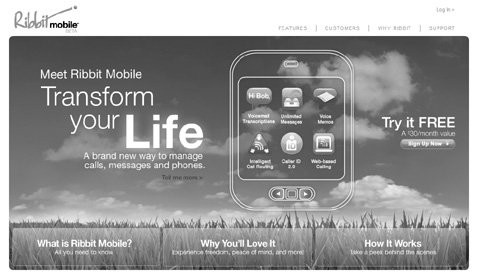
(Note the above image of the Ribbit Mobile home page was changed to grayscale by me)
Ribbit Mobile was a service for translating voicemail messages to text and delivering that text message with an audio file of the voicemail message, and those messages would be delivered by email and SMS. For myself, I have used similar services for over 4 years, and having the luxury of reading the text of a voicemail when you don’t have the opportunity to dial in to listen (e.g. when you’re in a meeting), not to mention the ready-access archive of messages, was priceless.
And that was just the case with Ribbit Mobile – they were not charging for “beta” this service for the 2+ years I used it. Near the end of last year I recall getting a survey from them on how much I would be willing to pay for the service. Then in January of this year I got an email saying Ribbit Mobile would be shutting down altogether the end of January, and there was no alternative. Ribbit itself as a company would still be around as they offer other services, like an Android app for voicemail and an add-on to Salesforce.com. The service was still running for a couple of weeks after the announced date, and went down altogether on February 16.As I said, this was a type of service you could get used to. I also have a similar voicemail to text service through Vonage which I use for my business phone. Prior to Ribbit Mobile I was part of the SpinVox consumer beta program which I talked about previously here at The Hot Iron. Interestingly, around the time SpinVox announced they were dropping their B to C service (they power Vonage’s voicemail to text) Ribbit Mobile came on the scene, and I was able to switch over with very little time without this type of service.
In between SpinVox and Ribbit Mobile I briefly used SpinVox through uReach, a company offering virtual voice, email and office solutions used by many small businesses. When Ribbit Mobile went away, I looked into see if it was still offered, and it took a call to uReach to find the “hidden” URL for the service (they offer it, but it’s not linked from their main Web site), and by visiting ureach.com/spinvox one can sign up for the voicemail to text service for $9.99/month plus usage fees for large volumes of voicemail. The uReach offering is not as robust as Ribbit’s, and for some reason breaks up voicemails when sent by SMS into several messages of 30 second lengths. But you can still get an email with the message text and audio file attached.
Am I the only one who will miss Ribbit Mobile? Am I the only one who uses voicemail to text? Please let me know in this post’s comments, as I know nobody else personally who uses, and loves, this type of service.
Did you enjoy this? Subscribe to The Hot Iron by RSS/XML feed or Read by Email.
This is from The Hot Iron, a journal on business and technology by Mike Maddaloni, Founder and President of Web consulting firm Dunkirk Systems, LLC.
Build • Business • Mobile Technology • Technology • (5) Comments • Permalink
Social Good Sports
By Mike Maddaloni on Friday, January 20, 2012 at 04:47 PM with 0 comments
On their own, business and sports are great areas of conversation in social media. Mix the two, and as it can be in real-life, it can be a tricky area to be in. Do it well, though, and it can go a long way.
This is what happened with me and a couple of others this past weekend, and related to the NFL’s AFC Divisional Playoff game between the New England Patriots (my team, which you may have gleaned from a post or 2 here on The Hot Iron) and the Denver Broncos. A couple of Broncos fans stepped up and offered bets with payouts via social media, and I jumped at the chance. With the Patriots handily beating the Broncos 45-10, My friend Glenn Letham and Jared from my favorite domain registrar Name.com paid me back this week via their blogs.
Glenn Letham

I met Glenn a few years back at Nokia OpenLab in Helsinki, Finland. Hailing from Vancouver, Canada – and formerly from the Denver area – Glenn is a journalist, speaker and expert in geographic information systems (GIS) and location-based services (LBS) and anything Geo for that matter. Though we have only seen each other in person a couple of times – once at the Nokia E73 Mode Beach Party (as pictured) and when he was in Chicago for a conference, Glenn is a great friend and collaborator, and always has time to answer a question or offer advice and support.
Add to that list a good sport, as he wrote a nice post on his blog, The AnyGeo Blog, about not only the Patriots win but a nice nod to 5 years of this blog. Had I won I had to write a post here about the Broncos. You can read that post on his blog here from this link.
Name.com

The fact that I made a bet on the Patriots/Broncos game with a Denver-based, globally renown domain name registrar is not unusual or surprising to me. From day 1 of my business relationship with Name.com, it has always been about people. I met my initial contact with them years back at a domain conference, and throughout the 4+ years working with them a person was always available to help if I needed one, in addition to them being proactive in offering assistance.
While I was tweeting with Glenn about the game last Friday, Jared the community manager at Name.com chimed in and offered to bet. Had I won, my Patriots fan Web site, GoPats.com, would have to pay homage to the Broncos. As I won, Jared had to go out and get and wear a Tom Brady jersey and post the picture on the Name.com blog. As a fellow bald guy I can say the colors work well for him, though I don’t think he quite sees it that way.
I tip my hat (which happens to be from the Patriots win in Super Bowl XXXVI) to Glenn and Jared and thank them for not only holding up their end of the bet, but in showing great examples of how tastefully done niche engagement on social media can be done well.
Did you enjoy this? Subscribe to The Hot Iron by RSS/XML feed or Read by Email.
This is from The Hot Iron, a journal on business and technology by Mike Maddaloni, Founder and President of Web consulting firm Dunkirk Systems, LLC.
Blogging • Business • Social Media • Thrive • (0) Comments • Permalink
Subscribe to The Hot Iron



The Hot Iron strives to present unique content and point-of-view on business, technology and other topics by Mike Maddaloni, a technology strategist based in Appleton, Wisconsin.
Photo credit: Logan Connor/Oomphotography
Value for Value
If you like what you are reading on The Hot Iron, buy me a coffee!
About Links
In posts here at The Hot Iron there are often links and banner ads for products and services. For some of these links and banner ads, I receive compensation if you click and/or eventually buy said products or services. Where most links are marked as such, it is safe to assume any link or banner ad is a compensated one.