
The Lack Of Women In Technology And Why I Don’t Touch Type
By Mike Maddaloni on Monday, January 20, 2014 at 04:55 PM with 4 comments

There has been a lot of talk and activity about encouraging more young women to enter the technology fields, whether engineering or software or any technical role. Much of the reason for the outside effort is that girls and young women are not typically encouraged to enter these fields.
When I first started hearing about these kind of efforts, I was initially surprised, namely as I have had the good fortune to work with many women over the years in software development and Web technology. Where when many think of the traditional “geek” it is a guy, there have been many women I would also consider geeks, and if I told them to their face, they would probably agree with me!
Perhaps maybe I am an anomaly, for as I pull back and see the big picture, I do see there are many more men in tech, whether it’s in the leadership within a company or within the industry overall. I haven’t studied this area in great detail as to statistics or even why there may be people discouraging women from getting into technology. For the more I think about it, I am not surprised that teachers, guidance counselors or even parents or family may discourage someone from taking classes in a subject area, as this was something I encountered myself.
I Don’t Know How to Touch Type
All that you are reading here, including the infrastructure and front-end code that presents my writings here on The Hot Iron, were entered into a keyboard with just my index fingers, plus my thumbs on the spacebar. Seriously, I don’t know how to touch type, and not only did I never take a class in high school to learn how to, but I was encouraged not to.
Though I was using computers back in junior high school, had my own computer at home and even did my first consulting gig for the assistant superintendent of my school system plus it was overall no secret I was into computers, the fact I should probably learn to touch type did not come naturally to my guidance counselors in high school. Their reasoning? As I was on the “college track” in high school, this was not a recommended course to take, and typing – which was offered in school – was encouraged for those not going into college and rather right into the workforce. Seriously, that was the thinking in the early 1980’s. I never did fight this, for by that point I had been typing this way for several years now.
Don’t get me wrong, this is not anything that has ever haunted me as a decision. I have managed to get by with just 40% of my digits on the keyboard and I am actually quite quick at typing this way. The reason why I remember this is because people, upon watching me type, will always ask me why I don’t touch type. As the question comes up almost as frequently as to why I sign my email messages as I do, it is a story that is readily accessible. Over the years I could have taken a typing class but never even made an effort to do so, as I am not sure how much different it would have made. Of course I am not saying this “guidance” led me down a different path, but it is a small example of the types of influences that are out there.
Expose To Most All, Let Them Decide
The more I think of this effort, the more I believe in it. As a parent, I don’t want to purposely hold back my kids from any career or activity decision, providing I can afford it. Though this is nothing I am worried about now, for right now my oldest first needs to learn to read, and my youngest needs to finish potty training! But by the time they are older, hopefully there won’t be a need for organizations like Ms. Tech and the many others, for opportunities will be chosen based on your interest, not negative outside influences.
I welcome you to share any stories – positive or negative or even anecdotal – on this subject in the comments to this post.
This is from The Hot Iron, a journal on business and technology by Mike Maddaloni.
Did you enjoy this? Subscribe to The Hot Iron by RSS/XML feed or Read by Email.


Strategize • Technology • Thrive • (4) Comments • Permalink
Controlling Your Own Destiny With Technology, Revisited
By Mike Maddaloni on Wednesday, January 15, 2014 at 12:25 AM with 2 comments
Over 5 years ago I wrote here on The Hot Iron about controlling your own destiny or controlling as much of it as possible. If you read (or re-read) the article, I was looking at this topic mostly from the point-of-view of working with external technology vendors and what happens when one doesn’t live up to expectations or even shuts down.

Fast-forward to 2014, and my lens on this topic has changed dramatically. Where then I was talking about control you had over external entities, now I am thinking of my needs and my information and if I even need external entities at all.
As time goes by businesses online come and go, or in some cases specific services from those businesses. From GeoCities to Posterous to Nokia Ovi to you name it, one day something you are using is gone the next, and hopefully you don’t lose tangible assets – e.g. data, photos, documents, etc. – in the process. Granted losing sleep, your temper or clumps of hair are collateral damage of this type of situation.
Add to this the overall uncertainty of technology and business, not to mention the ever-changing terms of services from vendors that may change to your disadvantage, or truly not knowing what is “behind the curtain” with a service or who or what has access to it, you may end up in a situation fast where you need to quickly change course.
So what do you do? Where every situation is unique, I’d like to share the path I am taking these days when it comes to online services.
Tell me what you want, what you really, really want
In short, that whole “goals” thing again! Having a goal, purpose, mission statement or random scribbles on a napkin can help guide you through the choices you make, In addition to the goal, think about other controllable factors, such as budget, timeline and how much time you have to invest initially as well as on-going. These factors can also influence your decision, no matter the goal.
Once you have gone through the goals and review process, and have made choice, pat yourself on the back, then plan for what happens if you have to make another change. As this change could occur next week or in the next decade, you don’t need a detailed, point-by-point plan, but you do need some information, such as contact, license, login and how you are using or customized the service. From there, determine how and to what extent you can extract data or information from the vendor or service, both for a final move or on a regular basis for off-site storage.
The Path of a Service Change
A couple of years back, after my several times a day ritual of reading what was new in the world in my RSS reader, Google Reader, I started to think about how I was reading, not what, and if there was a better way.
Google Reader, for those who don’t know, “was” a free RSS feed aggregator and reader from the search giant. It was a very popular service, but one that was slow to innovate. Despite this, I had over 200 RSS feeds subscribed to thru Google Reader, and it was my primary source for news and information, both on the world around me as well as technology, sports, and other topics of interest.
What I realized was quite simple – Google, or anyone who had access to the data stored in the Google Reader service, knows everything I read. Everything.
The more I thought about this, the more my decision became clear. There must be another way for me to aggregate and read RSS feeds where I have control of my destiny – the software, the service and most importantly the information. As I searched I found a variety of hosted services and software I could run myself. After some analysis and a personal recommendation from my good friend John Morrison, I went with Fever and have never looked back.
Fever is a self-hosted RSS reader developed by Shaun Inman. For just 1 person running the entire operation, Fever is a quality product. It is a paid license and is probably the best US$30 I have ever spent. With Fever I could get the same features I got from Google Reader, with a much more stylish Web interface, including a mobile-optimized experience for the iPhone’s Safari browser. It has a “hot” topic feature that I have never used and really can’t talk to, for the main functionality has suited me perfectly.
My migration from Google Reader to Fever meant installing the latter on a Web hosting service I use, then migrating the feeds from Reader to Fever. This step, though very straightforward, requires some knowledge of how a Web site with a database is setup and configured. For migrating the feeds, I could have automated the process and extracted all feeds and uploaded them into Fever. However I chose a manual process as I had not really taken a close look at all of the feeds I was subscribed to, and as a result I culled the collection by about 50 feeds, many which were no longer feeding any content at all.
In mid-2013, Google shut down its Reader service, causing an uproar from many, but not from me. By that point, I had been off of Reader for over a year. Google gave a long lead time to switch to any other service, which is now always the case. That being said, having control of the service means you own the information as well as how you access it.
Always Looking
As new methods, products and service become available, it is important to spend some time evaluating services. Reading and research alone are not enough, a stalking with friends and colleagues also help expose you to options as well as first-hand accounts of their utility.
Where in the past I have used services like Google Reader, Basecamp, Blogger and Google Calendar, today I am using Fever, ActiveCollab, ExpressionEngine and ownCloud respectively. I plan to talk more about some of these services in the future. But this is my list now, and it is subject to change without much advanced notice!
Have you yourself changes services or rolled your own, or is it something you don’t see yourself doing at all? I welcome your thoughts and questions in the comments of this post.
This is from The Hot Iron, a journal on business and technology by Mike Maddaloni.
Did you enjoy this? Subscribe to The Hot Iron by RSS/XML feed or Read by Email.
Strategize • Technology • Web Development • (2) Comments • Permalink
3 New Year’s Resolution for Digital Marketers
By Mike Maddaloni on Tuesday, December 31, 2013 at 06:55 PM with 0 comments
 Editor’s Note – This is a guest post from CT Moore, a recovering agency hack who helps brand leverage search and social media to meet their business goals online. By day, he heads up Search and Social at Publikit, a boutique web dev agency in Montreal, and also runs Socialed, a digital consultancy that provides digital strategy to both start-ups and multinational brands alike. You can find out more about him through his personal blog.
Aha! Another year is about to come to close and a new one will soon begin. And if you’re any kind of marketer (or business person for that matter), you’ve probably started thinking about what you could start doing in 2014, or at least do better in 2014 than you did in 2013.

Well, if that’s the mind frame you’ve been in, I’d like to suggest 3 potential New Year’s Resolutions that you should probably apply toward your upcoming marketing efforts. I have to warn you, though: if you’ve already made up your mind on how to tackle things in 2014 and aren’t open to feedback, you should probably read no further — I’ll just end up saying “I told you so” ;)
#1 OWN Your Media

Paid media is the placement you pay for: ads, commercials, etc. Earned media is the PR and social media wins you get from doing awesome stuff and providing great customer service.
Owned media, however, is the stuff you produce that people actually care about. In fact, what kinda of makes it “media” is that people actually pay attention to it (unlike ads). It can be anything from just really helpful how-to’s to outright entertaining viral stuff, but the point is that it gets you exposure with the right target market, just like PR or advertising would.
The only difference is that you made it. And right now, 78% of CMOs believe that branded content is the future of marketing, with 25% of budgets going to content. So in 2014, start thinking about how to own your media.
In fact, start investing in media worth owning. Because, at the end of the day, content is a lot like tattoos: it can be either cheap or good, but not both.
Good content costs money to make, and you have to keep at it for a while before it pays-off; but when it pays-off, it really pays-off. From branding to public relations to SEO, it’s one of the few channels that also contributes something to all the other channels.
#2 Get Serious About Mobile
 Yeah, I know: a lot of you think you’re serious about mobile? But are you really? I mean, are you anywhere near the companies whose marketing you admire/envy, and/or can you actually implement the kind of strategies they have going on??
Now, I could dig up a bunch of stats and quote them to create urgency and make you sympathetic to my point. But, instead, I’ll just guess (i.e. “assume”) that enough of you reading this have smart phones (and are sufficiently attached to them) that I don’t need to do that kinda thing. So let me leave you with a kind of barometer / checklist to figure out just how the eff you’re supposed to tackle mobile in 2014:
- Mobile Sites: I’m still shocked by just how many top-tier companies/sites/portals fail at this. If you don’t have a mobile site, get one. And if you already have one, make sure that I’m redirect to it if I visit your site from a mobile device.
- Mobile App: If your business is driven by user-experience (e.g. commerce) or content, release that App already! No repeat customer or returning user wants to deal with your mobile site. And even here I can think of a few content portals who have an otherwise great mobile engagement strategy but no mobile app…
- Mobile Campaigns: If you’re already investing in display ads, PPC, and/or SEO, start looking at how you can divert some of that toward targeting mobile users; there are enough of them using mobile apps and searching via mobile devices that you can’t afford no to.
Okay, so you get the point? Good! Let’s move on….
#3 Start Listening to Your Customers
 So maybe you’re already doing the mobile and content thing, or may you’re not but (hopefully) are gonna start. Either way, you’re going to have to measure your progress. And, of course, you’re going to be measuring and monitoring what user actually do once they engage with your brand.
But are you being proactive in that measurement? In other words, are you actually trying to gage how your users specifically and the market at large feel about your industry?
For starters, start looking at what people are already saying about both you and your competitors. Tools like Salesforce Marketing Cloud are great for this kind of thing. They let you monitor not only your brand name but what people are saying about your industry and competitors, in general.
Step it up a notch, though, by finding what your actual user and site visitor think. There are a few service providers that can help you do this, but the (ubiquitous) one that comes to mind is iPerceptions. You’ve probably come across them in the form of their 4Q survey, which is a free tool. But they also offer a bunch of voice of customer measurement tools you can upgrade to to make sense of the data that you collect via the 4Q survey.
The point is (1) stop assuming you think you know better than your (potential) customers, and (2) stop looking at what your users might’ve done and start considering what they’re actually looking for. Because that’s the kind of insight that’s not only gonna help you step up your marketing game, but develop better products and services, the likes of which you might’ve not otherwise considered…
New Year, New Start
If you’ve read this far, I want to make one thing clear: I’m not saying you have to follow my advice. I’m just saying you should.
You’re free, of course, to disregard my advice, but I’m confident enough that you’d be wrong to do so that I wrote this blog post and put my name on it. So give it some thought; sleep on it; and do whatever it is that you have to do to “tear sh*t up” in 2014 that you’ll be too busy either optimizing some version of your site or developing new product/service that you won’t give this post another thought ;)
This is from The Hot Iron, a journal on business and technology by Mike Maddaloni.
Did you enjoy this? Subscribe to The Hot Iron by RSS/XML feed or Read by Email.
Business • Guest Post • Mobile Technology • Strategize • Technology • Thrive • (0) Comments • Permalink
Follow-up On Divvy Bikes And Helmets – Boston Debuts Helmet Vending Machine
By Mike Maddaloni on Wednesday, November 20, 2013 at 11:01 PM with 2 comments
About a month ago I wrote here on The Hot Iron about how Divvy, the extremely popular bike sharing program in Chicago, did not offer helmets. I also discussed several options for them to offer helmets to their riding customers, including people selling them to the idea of a helmet vending machine.
Little did I know such a helmet vending machine had been developed, and last week was introduced in Boston for its bike sharing program. HelmetHub is a vending machine which was born out of MIT, and offers to either sell or rent a helmet. The vending machines have a style similar to the bike rental stations in Boston and Chicago (which are run by the same company) and will fit in well with those stations.
You can read more about HelmetHub on their Web site and see pictures and options for the vending machines.
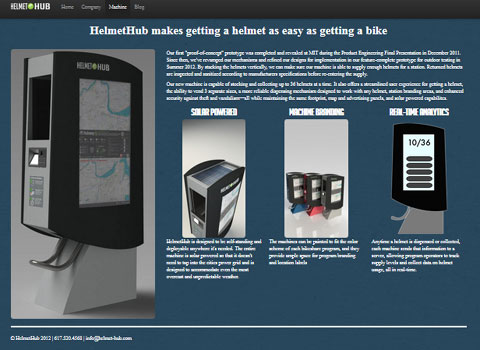
It’s great to see such a service offered, and nice to know I was not the only one thinking along this line.
Would you buy a helmet from a vending machine? I welcome your thoughts in the comments of this post.
This is from The Hot Iron, a journal on business and technology by Mike Maddaloni.
Did you enjoy this? Subscribe to The Hot Iron by RSS/XML feed or Read by Email.
Build • Business • Strategize • Technology • (2) Comments • Permalink
How I Took An Idea And Made It A Reality
By Mike Maddaloni on Sunday, November 17, 2013 at 11:46 PM with 0 comments
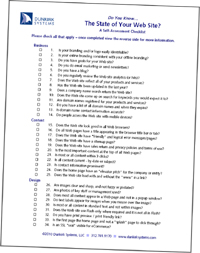 With all the ideas and events swirling through the Windy City during the recent Chicago Ideas Week, one of those thoughts was what I would like to share here, how I took an idea I had and made it a reality. Though this story took place a few years back, it is still very vivid in my mind.
My idea was to create a piece of marketing collateral for my Web consulting business. In this case, I could leave it would a prospect client, allow it to be downloaded from the Web and simply put it out there in printed format, the last 2 cases would be for anyone who wanted it. Depending on where the prospect was, it could server anywhere from a calling card, functional tool or a call to action to contact me.
Origin of the Idea
In my Web consulting business there were 2 categories for prospects – those who did not have a Web site and those who had one and were looking to possibly redesign and/or rebuild it. Where there were many common elements between the 2 for the sales process, when talking with someone who already had a Web site there was always a level of ambiguity to what exactly they needed or wanted to do and to what extent.
To try to streamline this process in a non-intimidating way, I thought of a form of checklist, where someone could read off the list to see if they had any or all of the items incorporated into their Web site, or at least to pose the questions in the event they didn’t know. In my mind’s eye I had a partial vision of the checklist. I saw it as paper-based, as likely someone would read a question from it then look on their Web site on their computer’s monitor for the answer. I wasn’t sure if there should be a score of some form or not. I was very sure I did not want it to be too technical and I did want it targeted to the business owner.
As for what would be in the checklist I had some ideas, but this was something I wanted to put time into over a period of time, then organize them into the checklist.
Like Rodney Dangerfield’s Joke Bag
The process of collecting the items for the checklist had me recalling a story I once heard about the late-great comedian Rodney Dangerfield. Before he got into comedy, he was a salesman and would write jokes on pieces of paper and put them into a duffle bag. When the bag was full, he had the material he would use on stage.
My approach was similar, yet different, as my duffle bag was digital – consisting of folders on my hard drive and in my email program. The ideas I captured varied from text files to links to other Web sites to email newsletters, where some of these items were direct ideas and others either categories or thoughts. I let this collection come together over a period time (exactly how long I do not remember). Then one day I decided to start the process to build the checklist.
Molding the Ideas into the Finished Product
As the collection process had elapsed some time and I didn’t remember everything I had put together, I decided I would go through them, one-by-one and begin curating a list. This was facilitated with the help of my whiteboard. As I read an item, I checked if it I already had it on the board, and if not I added it in some semblance of order. When all was done, this is what my whiteboard looked like:
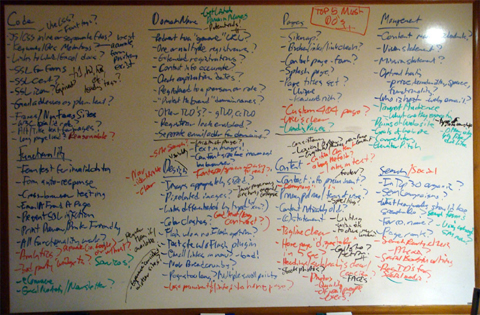
At first glance, it is a mess. But it was the first pass at the organization of the items and ideas. Needless to say it was worthy of a picture!
From here, I started typing up the ideas, and in some cases I would combine like or similar ones. As I typed them up, I erased them from the whiteboard. At the end of this process hundreds of files and emails were in a clean list, just as clean as the whiteboard now was.
The next step was to boil the list down to a manageable, 1-page list, with the top, most important items on it. This was done over several days, as I would look at the list for a while, then revisit it later with a fresh brain. In the end, I finalized a list of 34 items and broke them down into 3 categories – business, content and design. I also came up with some copy to describe the checklist to put on the reverse side of it. At this point I felt really good about the checklist. Well, except for the name of it.
(Queen’s) Landing on the Right Name

The original name I had for the check was, and get ready for it:
The Web Site Redesign Self-Assessment Checklist
Yes, it sucked. Here I spent all of this time and produced what I felt was a quality product, yet the name would surely be a turn-off, and in some cases scare off people. I decided to put the completed checklist aside as I needed some more quality time to get the name right.
On a Friday evening after work, I went for a walk along Lake Michigan. Armed with a good cigar, I just needed to clear my head after a busy week and stretch my legs. As I was strolling by Belmont Harbor, the topic of the checklist name came front in center in my head. I recall shaking said head and saying to myself, “why don’t I have a better title for this” and the gears in my head started to crank.
As I headed south along the lakefront path, I started decomposing the goal of the checklist. The thought process went something like, “it’s where your Web site is now… it’s a point in time… it’s the current state your Web site is in… wait, that’s it – it’s the State of your Web Site!”
I stopped where I was, at a place along the lake called Queen’s Landing and called my office line and left myself a voicemail message on the name so I wouldn’t forget my inspiration. When I got back from my walk I edited the Word document with the name and then registered the domain name for it.
The State of the State Then and Now
Upon completing the checklist I setup a download page for it and promoted it here on The Hot Iron and elsewhere. I printed copies of it to give people in person and to bring to events as a leave-behind. Although the list never was mentioned on the cover of the Wall Street Journal, it would get a handful of downloads each week and I got good feedback on it from prospect clients and current clients as well.
Now almost 3 years after I created the checklist, it needs to be updated a bit, which would come probably after a new brainstorming session on it. That being said, there are many core concepts on the checklist that are still very relevant today as-is.
See for yourself – download a copy of The State of Your Web Site here right now!
Ideas, Visited
Ideas are just that, intangible thoughts. Without any action, they will remain in that state, floating out there. I know, as The Hot Iron is full of ideas I have had over the years. Where I have acted on many of ideas over the years, I am very proud of the creative process I have just shared here.
Your thoughts – and ideas – on the checklist and the process which led to it are welcome in the comments.
Editor's Note: This post was updated to correct and replace broken links.
This is from The Hot Iron, a journal on business and technology by Mike Maddaloni.
Did you enjoy this? Subscribe to The Hot Iron by RSS/XML feed or Read by Email
Build • Business • Strategize • Technology • The State of Your Web Site • Thrive • Web Design • Web Development • (0) Comments • PermalinkSubscribe to The Hot Iron



The Hot Iron strives to present unique content and point-of-view on business, technology and other topics by Mike Maddaloni, a technology strategist based in Appleton, Wisconsin.
Photo credit: Logan Connor/Oomphotography
Value for Value
If you like what you are reading on The Hot Iron, buy me a coffee!
About Links
In posts here at The Hot Iron there are often links and banner ads for products and services. For some of these links and banner ads, I receive compensation if you click and/or eventually buy said products or services. Where most links are marked as such, it is safe to assume any link or banner ad is a compensated one.