
Update Your Domain Name Contact Information
By Mike Maddaloni on Wednesday, July 15, 2020 at 11:00 PM with 2 comments

Where I’d like this simply to be friendly advice, I present it as a warning – update the contact and payment information for your domain names as soon as possible or you could risk losing your Web site and email.
Keep It All Current
It’s a challenge to manage all of the online accounts we have, both personally and for business as well. Often an account can “linger” out there without any problem, such as a frequent flyer account, if you don’t have your most current mailing address on file with the airline. However, a domain name registrar account doesn’t fall under this category. Why? You never know when you will need to make a change to or renew your domain names, and if you need to do so right away, you may be prevented from doing so.
Even if you have private registration on your domain name account, your contact information needs to be current. For those not familiar, private registration is when someone looks up the registration of your domain name, instead of seeing your actual name, address and phone numbers, they will see masked information. This is to prevent someone from scraping your contact info for the means of soliciting you, or worse – scamming you.
Keeping it all current means your domain name registration remains active and accessible. This includes your name, address and phone numbers, as well as the billing credit card for renewing your domain name.
Untimely Lockout
If your information isn’t correct, you may lose access to your domain name account and would need to have it reestablished, or worse, your domain name can expire and you can’t renew it in a timely manner.
How does this happen? Many domain name registrars are activating two-factor authentication, or 2FA, without explicit notification to or opt-in by its customers. 2FA is when you get prompted to enter a code that was sent to you by email or text message, or an app like Google Authenticator which generates a code. I have personally experienced this from several registrars, and if the phone number or email on file is no longer accurate, then you can get locked out of your account. Where the registrars say they are doing this to protect their customers, when a Web site and email is down, more damage is done.
If the information is accurate and correct, you won’t run the risk of losing access to your account. If this does happen, you may have to “prove” who you are offline, including sending in a copy of a driver’s license or other forms of ID, or even articles of incorporation for a business.
Remind Yourself Online and Offline
Most domain name registrars will send you reminder emails or texts when it’s close to your domain name expiration date. That is, if they have your correct email address and phone number, and you have enabled these notifications.
A simple way to remind yourself to check your domain account information is to put an alert in your calendar. I recommend setting one sixty days before the domain name is set to expire. That way if the information is not current, you have some time to take care of any process your registrar imposes, and can still renew it before it expires. Setting alerts every 3 months is not a bad idea either, especially if your credit card changes or your home or business address changes, especially in an increased work-from-home environment.
Additionally, information on your domain name should be in your “vital records” file. In the event there is a change in management or leadership in your form or organization, the first thing the successor may not be thinking about is the domain name. That is, unless it expires and the Web site disappears and email stops working. A simple 1-page sheet, sealed in an envelope and clearly marked, listing all domain names and their expiration date, the registrar Web site and contact info and the login and password should be sufficient.
Pro Tip on Extending Your Registrations
Domain names are often renewed annually, however you have the option to extend their registration up to ten years in advance. I recommend this for the primary domain name for your Web site and email, and any other domain names tied to key sites and services. Where it is not completely a “set it and forget it” scenario, you do gain some peace of mind in not having to renew it annually.
Deconstructing Domain Name Registrations
Everyday your Web sites and email become increasing vital to yourself and your firm or organization. Maintaining their domain names is equally as vital to ensure those services are accessible. This maintenance is not laborious or even time consuming; it simply has to be done. Reminding yourself and others key people will ensure there is awareness and coverage for this important task.
This is from The Hot Iron, a journal on business and technology by Mike Maddaloni.
Did you enjoy this? Subscribe to The Hot Iron by RSS/XML feed or Read by Email
Business • Domain Names • Technology • (2) Comments • PermalinkDon’t Get Used To A Desk
By Mike Maddaloni on Tuesday, July 07, 2020 at 03:45 PM with 0 comments
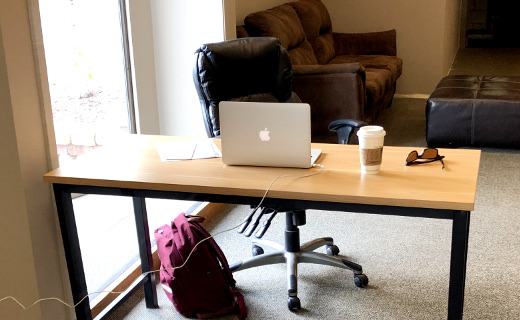
There are certain things in life we seem to remember forever. It could be a song, a saying or advice that really resonated with us. The latter happened to me, and it is something that has been a positive message to me over the decades of work and into these current times.
What was it? “Don’t get used to a desk.”
The Origin of It At a Desk
Shortly after completing the multiweek training program at my first job after college, I would be sent off into the wild to add value for clients of the consulting firm. Or in this case to the “bench” – as there was not a billable project to work on, I would await one while working on internal, non-billable projects. But before I was released, I was to meet with the vice president of HR for the firm.
For some reason I can still remember the scene – he sat behind his large desk in his large office. There was some small talk, then he espoused the wisdom that stuck with me, “don’t get used to a desk.” Being the naïve early-20’s kid that I was, I didn’t question it, simply said thank you and went on my way. My first desk was a traditional metal desk with a large cathode ray tube, or CRT, workstation on it in a large room in the building that was called a bullpen, that I shared with several other recent trainee-graduates. Certainly I didn’t want to get used to this desk.
One of Many Career Tools
As I progressed along in my career, I collected a wide variety of tools that I carried in the metaphoric toolbox I brought to work every day. Some were major, like what I learned about programming in the “real world” as compared to what I taught myself and learned in college. Some were minor but no less significant, like the soft consulting skills I learned the hard way that I was never formally taught anywhere. Not getting used to a desk was one of them.
This advice came in handy many times over the years, namely due to the variety of desks I have had. I had my share of folding banquet tables, namely in temporary offices setup for the work I was doing at the client. But that wasn’t the worst case, as that honor goes to the plywood-walled off section of a dimly-lit warehouse of a defense contractor during the Persian Gulf War. To the other extreme were nice cubicles in an office environment, and some of them even had a window view. But nice wasn’t just for the office equipment; for on one project I worked on we had a “war room” where the entire team was in one high-collaborative space. Some of the offices even provided me with a nametag, and in most cases my last name was spelled correctly.
Where the advice really resonated with me, however, wasn’t directly related to the esthetics of the desk or workspace itself. It had more to do with the fact that where I sat or stood to do work really didn’t matter. Despite the worst of the scenarios (did I mention I had to wear my winter coat in the dimly-lit warehouse as well?) I was able to be productive and get my job done. Sure, I have preferences to where I would like to work, but for the most part my physical surroundings have been a non-issue to where I have worked over the decades.
Coming Full Circle
As this advice was given to me long before social media, eventually I connected with the person who offered it years later on LinkedIn. When I did I shared with him that his advice stuck with me and was vital to me as I worked in consulting and for companies.
His reaction? He laughed! In addition to being a senior leader at the firm I first worked for, he is an extremely talented improvisational musician. Though he wasn’t able to recall the meeting as vividly as I did, he admitted he often would improvise such advice to young employees of the firm as the started on their careers. He was grateful I remembered it and that it served me well.
Deconstructing Not Getting Used to a Desk
There are many things we learn informally in life and our careers, many of them are soft skills that never appear in any text book or course material. Where many go by the wayside, some stay with you over time. I believe these that do are situational, especially ones that are put to the test and work to your advantage. Not getting used to a desk served me well, not only in the midst of a less-than-ideal work location, but in the hope of a better one to come along in the future.
This is from The Hot Iron, a journal on business and technology by Mike Maddaloni.
Did you enjoy this? Subscribe to The Hot Iron by RSS/XML feed or Read by Email
Business • Thrive • (0) Comments • PermalinkMy Personal Scrum Boards
By Mike Maddaloni on Wednesday, May 27, 2020 at 10:14 PM with 4 comments
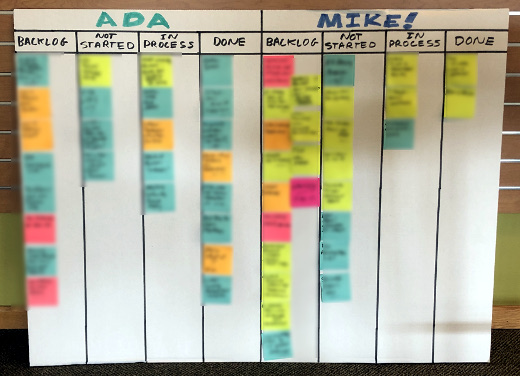
Shortly after completing my Scrum training and becoming a Certified ScrumMaster, it was clear to me that in order to be successful at the Agile framework, I have to be an active practitioner. Where I am planning that in my job with my director who is a Scrum Master himself, I sought other ways to use it.
Where I am applying Scrum right away is in my own work and in my personal life. The latter was reinforced when I read Scrum: The Art of Doing Twice the Work in Half the Time by Jeff Sutherland as he talks about how to use Scrum well beyond software development. This led me to creating personal Scrum Boards for both. The picture accompanying this post is of my Scrum Boards, with my work one to the left and my personal one to the right.
Elements of a Scrum Board
A Scrum Board is a tool for tracking progress and providing visibility on a project. There is single definition of how one is structured or organized, as it should ideally fit your needs, whether individually or for your Scrum Team. The basic components of it should include the following, and I also indicate how I have adapted these components for my needs.
Backlog – A Backlog is the work to be done. Larger, higher-level items are called Epics, and smaller, shorter, more specific items are called User Stories.
In both of my Scrum Boards the Backlog is the first column – yes, I purposely blurred out the tasks in it, both for confidentiality and to not bore you, my dear reader, of the mundane minutiae of my life. Most all of these are User Stories. Each is written on a Post-It note so they can be easily moved around.
Not Started – This is actually an optional component, and is also referred to as a Sprint Backlog. All work done in Scrum is done in Sprints, a defined period of time such as 2 or 4 weeks. The items in these columns are what I plan to work on during the week. As it is not required, I simply could have all of my Backlog prioritized in one column.
For myself, I have 1-week Sprints. At the start of the week, I review – or Refine – the Backlog and select the work to be done in the Sprint. Refinement also includes readdressing the priorities of Epics and User Stories, which can vary from week to week, or in this case Sprint to Sprint. Once this process is completed, I move the Post-Its to the appropriate column.
In Process – When I start an Epic or User Story, I move it to this column from Not Started, indicating what I am actively working on.
It’s not uncommon for me to have multiple items in process as I am often awaiting something else to be completed to proceed. It is not my intent to have more things in process than I can manage. The goal here is to use this to get more work done by breaking tasks into smaller components.
Done – Once a User Story or Epic has been completed, it gets moved to this column, and a small celebration takes place in my mind.
The accompanying photo was taken towards the end of last week, when I had several items done, and since then I completed more. At the end of the week I clear all Done items, and hold a review, or Retrospective, to go over the week, realities in my schedule, setting up the next Sprint the following week.
More To It Beyond Myself
In using Sprint Boards for personal work, I am adapting it from a standard Scrum flow. I am performing the roles of a Scrum Team myself – the Scrum Master, Product Owner and Development Team. I also am not doing a Sprint Review per se, a process of demonstrating the work of a sprint for approval, for as I move an item to Done I am reviewing it at that time. Additionally, my Retrospective and Refinement processes are not as involved.
A Scrum Board is typically displayed prominently in an office or managed using an online tool that all have access to. Mine is on a project board that kids use at school for presentations, as its tri-fold format allows me to easily transport it through my house or even to my co-working space. During the workday it is open and visible and at night it’s folded away.
There are other components that can be added to a Scrum Board. This article from Scrum Inc. on Scrum Boards expands more on them, and how other elements of Scrum interface with them.
You Can Do It
Have I convinced you to have your own Scrum Board? I welcome your thoughts and how you manage your own in the comments to this post.
Deconstructing Scrum Boards
A single, visible place for all elements of your project are what Scrum Boards are for and are a key component to the Scrum framework. Though my own Scrum Boards are modified in some form to use for myself, even in this form it is good practice to follow as my overall work is transformed towards Agile.
This is from The Hot Iron, a journal on business and technology by Mike Maddaloni.
Did you enjoy this? Subscribe to The Hot Iron by RSS/XML feed or Read by Email
Business • Agile / Scrum • Thrive • (4) Comments • PermalinkSay Disaster Recovery Again
By Mike Maddaloni on Monday, May 11, 2020 at 05:55 PM with 0 comments

At some point we switched from saying "disaster recovery" to "business continuity," and I think it's time to switch it back.
Perhaps it started in the 1990's when a wave of buzzwords and political correctness came into vogue. The phrase “disaster recovery” has such a harsh tone to it, where “business continuity” is so much more positive, isn't it? Positive, sure, but did losing the edge of the phrase diminish the need for how we often apply it, in creating a disaster recovery plan?
Disaster recovery planning is creating an action plan and related activities in preparation for a disaster in one’s life. It is typically something a business does, but individuals and families can prepare one as well.
By calling it recovery rather than continuity, we have a sense of urgency and a goal of pushing forward, wherever it takes us. Continuity implies we will still be the same afterwards, where as we are living now that may not completely be the case. By using the term disaster rather than business, it means it impacts all of us, not just businesses. Individuals, families and related organizations all need a disaster recovery plan and to be included in a business’ plan too, including the resources to execute on that plan, and I’m referring to more than pallets of toilet paper. The contents of a plan would be different based on a focus of more creative options.
The onset of a pandemic on a free-market, capitalistic society has been devastating. Now in the third calendar month of it, we are seeing daily reports of businesses - not just small businesses but large ones too - filing bankruptcy or closing altogether. This is on top of record layoffs and furloughs leading to record unemployment claims. The "disaster" today is not just with companies but with people as well. Many of both were not prepared or prepared to the degree they needed to be.
So what do you think? I welcome your thoughts in the comments to this post.
Deconstructing Disaster Recovery
Words matter. By softening them it may pease some people, but it could also be detrimental to the goal of using those words. Disaster recovery says there was something bad, and we are going to come back from it. This phrase - and goal - is what we need right about now.
Image of cap generated from The Washington Post
This is from The Hot Iron, a journal on business and technology by Mike Maddaloni.
Did you enjoy this? Subscribe to The Hot Iron by RSS/XML feed or Read by Email
Business • Strategize • Thrive • (0) Comments • PermalinkLow Budget Green Screen for Zoom Meetings
By Mike Maddaloni on Tuesday, April 14, 2020 at 11:42 PM with 3 comments
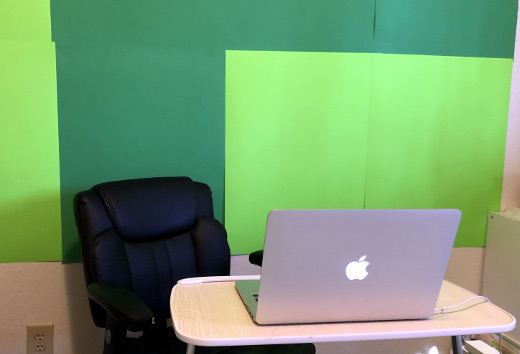
A popular feature of the videoconferencing platform Zoom is virtual backgrounds. This allows you to show a picture or video behind you, transforming whatever bland background you have into a scenic vista. If you have a newer Webcam, either built-in to your computer or standalone, it will easily isolate you from whatever is behind you. However not all Webcams can do this. But with Zoom there is another way to achieve this, by using a green screen.
A green screen, or chroma key screen, is a solid green background behind you that, in simple terms, will isolate you in the picture and put an image or video behind you. This technology is common on TV and in movies, as this is how weather reporters present the map behind them and in movies it is used instead of building robust set backdrops. As my own Webcam didn’t work with virtual backgrounds, I sought out a green screen. What I found, however, was more expensive than I wanted to pay; I am simply trying to leverage this feature while I am in this current work situation. Then is dawned on me, there could be another option – green poster board.
A visit to a local dollar store found options for poster board – light and dark green, and only 69 cents per sheet. As I wasn’t sure which shade would work, I picked 4 sheets of each, all for under 6 dollars. With some masking tape, I was able to hang them on the wall, as shown in the opening photo. Where the sight of this in itself doesn’t look professional, in its use it’s quite the contrary.
Below, without turning on the virtual backgrounds in Zoom, the camera image looks like this.

When I turn on virtual backgrounds, there is a sunrise over Cocoa Beach, Florida behind me.

You may have noticed I used both shades of green, as I tried this when I realized I needed a larger area, and they both worked together. A bonus of this solution is the poster board is made by a local company here in Appleton Wisconsin, Pacon Corporation.
Deconstructing a Low-Budget Green Screen
When a situation changes, it is easy to pivot to another solution and spend to accommodate it without thinking of the short-term vs. long-term cost implications. When I put thought into it, ingenuity found an alternative solution that completely solved the need.
This is from The Hot Iron, a journal on business and technology by Mike Maddaloni.
Did you enjoy this? Subscribe to The Hot Iron by RSS/XML feed or Read by Email
Business • Technology • Thrive • (3) Comments • PermalinkSubscribe to The Hot Iron



The Hot Iron strives to present unique content and point-of-view on business, technology and other topics by Mike Maddaloni, a technology strategist based in Appleton, Wisconsin.
Photo credit: Logan Connor/Oomphotography
Value for Value
If you like what you are reading on The Hot Iron, buy me a coffee!
About Links
In posts here at The Hot Iron there are often links and banner ads for products and services. For some of these links and banner ads, I receive compensation if you click and/or eventually buy said products or services. Where most links are marked as such, it is safe to assume any link or banner ad is a compensated one.