
A Next Frontier In Mobile Is Behind The Corporate Firewall
By Mike Maddaloni on Tuesday, February 15, 2011 at 05:00 AM with 0 comments
While I say I cannot predict the future, sometimes things are so glaring to some and not others, by pointing out you are opening eyes for some people. One of them for me is “a” next frontier in the use of mobile technology – to get beyond the corporate firewall and use all of the tools and data like you can do on a full computer. Note I say “a” next frontier, as it is out there, I just don’t know if it’s the “next” or “last” frontier.
Why do I believe this? Over the years I have managed public Web sites, corporate Intranets, Extranets, portals and knowledge management systems. I have seen how these tools, when used effectively, make people productive. I have also seen how when not managed properly they become a huge mess and waste of resources. Typically, there is a mix of these within most organizations, everything from advanced applications, to a PC under someone’s desk hosting a group’s Intranet Web site, to email.
Going Beyond Email
Using your mobile device to work as you would at work is long overdue. Most corporate workers who have a mobile device use it for email. But beyond email, there may be a limited amount of apps or data available to them. Mobile devices have Web browsers, but you may not be able to make a VPN connection within your company’s firewall. Not having this prevents you from accessing what you can do on your work computer, from your desk or away from it.
More and more email is being used to get around this lack of access. Have you ever asked co-workers or your admin to send you files or information you can’t get at? I see this all the time as friends – even my wife – have to do this in order to get what they may need for a conference call they have to make from a remote location. There’s no other way, especially if getting online with your notebook computer is not an option, or you don’t want to lug it (and power cables, etc.) around.
Going Beyond Mindsets and Existing Network Infrastructure
Shortly before his inauguration, there was buzz about how US President Obama wanted to carry a BlackBerry. In the end, he got one. It is not completely known what kind of security is in use with his device, but the bottom-line is it was achievable. My guess is it’s not out of reach for most companies.
Part of the issue with going mobile with your company information is a mindset it is not secure. This is where you need to go beyond your current infrastructure. As tablets and smarter phones hit the market and become more and more commonplace, the demands from staff will require both of these looming issues to be addressed.
Do I Need An App For That?
Once you go beyond the firewall, the fun begins. Some content and applications may already look great on a mobile browser. Some package applications may already have mobile-friendly interfaces, or even apps to access data. I recently saw a development tool for interfacing with CICS screens on an iPad. (If you don’t know what CICS is, its how most applications were developed on mainframe computers that allowed users to enter and query data. As many CICS screens are still alive and kicking today, thus the opportunity for such a tool). Then there’s the content and applications where you’ll need to either build or buy (or both) to access them outside of the office.
Access content and data in multiple formats on multiple platforms is an opportunity to drive innovation in your corporate Intranet and sites. Everything from comprehensive search to centralizing content to reaping value “dead” or unpopular content can be gained from this effort. As you go forward, build into your requirements mobile platform compatibility, whether for your own internal development or for your third-party vendors. Just think about taking an online training course on your mobile device while sitting in the waiting room for jury duty, and you get the power and convenience of extending the workplace to mobile devices.
Keeping Up With Small Businesses
Many small businesses have some of this capability already. Google Apps works well on Android devices. Salesforce.com has apps for many devices. QuickBooks Online has mobile versions of its full Web-based application. All of these are hosted, third-party services, which does not require the infrastructure to go beyond the firewall. As some larger businesses use Salesforce already, they have an advantage with the ability for their users to work on a mobile device.
Big Picture Thinking On Little Devices
Looking back on what I have presented, I covered a lot, and at a high-level, big picture perspective. As anyone who has worked in computer systems knows, the devil is in the details. But keeping in mind a roadmap to where you want to be, from the short-term to as far out as you can realistically plan, literally getting the information into the hands of those who need it will be critical and advantageous for any business. Let alone the opportunity for those who will be involved in making this happen, whether they build mobile hardware, platforms, apps or supporting software.
Do you agree on this future frontier of mobile? Are you looking forward to it? Are you using it today? Please share your thoughts in the comments of this post.
Did you enjoy reading this? You are welcome to subscribe to The Hot Iron by RSS feed or by email.
Next likemind Chicago on Friday February 18
By Mike Maddaloni on Monday, February 07, 2011 at 07:28 AM with 0 comments
 The next likemind will be Friday, February 18, 2011 in dozens of cities around the world.
In Chicago, it will be at Argo Tea, 140 S Dearborn St. at the corner of Adams and Dearborn Streets in the Loop from 8:00 am to 10:00 am.
I call likemind a gathering of creative-minded people, from various disciplines including Internet, advertising, art, social media, et. al. For more on likemind, read this great article on likemind Chicago from the Newcity and likemind from the New York Times.
Follow @likemindchicago on Twitter.
Watch for future date announcements at http://likemindchicago.com/ - and Web site coming soon at that address!
Did you enjoy reading this? You are welcome to subscribe to The Hot Iron by RSS feed or by email.
New Web Site for Downtown Chicago Loop Condo For Sale At 5 North Wabash Avenue Suite 1204
By Mike Maddaloni on Friday, January 21, 2011 at 04:26 PM with 0 comments
Where we at Dunkirk Systems, LLC have clients who sell goods and services through eCommerce Web sites we built for them, never have we built a Web site for just one sale. In this case, it is a condominium in downtown Chicago, Illinois.

The property is at 5 North Wabash Avenue, Suite 1204 in Chicago’s Loop. In a century-old building recently renovated and around the corner from Millennium Park, this 1 bedroom, 1 bathroom plus a den with loft ceilings is a unique property. To enhance the sales process, we were brought on to develop a Web site for this recently listed property. It leverages information from its multiple listing service (MLS) listing, as well as a service used by the REALTOR to photograph and create an interactive floorplan. This also includes a North Wabash Avenue Suite 1204 mobile Web site complete with a QR code and link on every Web page. As with any Web site Dunkirk builds, we built into it the ability for the client to specify and define content, sitemaps to submit to search engines, statistics with Google Analytics and social media link buttons.
Check out the site at www.FiveNorthWabash.com, and if you or a friend or colleague are interested in a condo showing, please contact .(JavaScript must be enabled to view this email address).
Did you enjoy reading this? You are welcome to subscribe to The Hot Iron by RSS feed or by email.
3 Words For Your Web Site In 2011
By Mike Maddaloni on Monday, January 17, 2011 at 05:00 AM with 4 comments
 With the start of a new year, many people come out with predictions or trends they see for the coming 12 months. There’s plenty of great writings out there already, so I will not add to the list (if you want to read a good one, there’s Emily Brackett’s Top 10 Web Design Trends for 2011 That Will Help Your Small Business).
As I was pondering my 3 words for 2011 as presented by Chris Brogan I thought of suggesting 3 words for your Web site for 2011. These 3 words are “guiding pillars to focus on in the coming year” as Chris describes.
My 3 words for your Web site are – Measure, Function and Backup.
Measure – Any decision you make for your Web site (or for your business for that matter) should be the result of facts or planning. Whether these are successful or not are determined by the numbers, and you must measure them to ensure if you are on track, way off, or need an adjustment. Many people do not measure their Web site. This starts with the hits, which many people use Google Analytics to measure. It then continues with feed tracking (for blogs or RSS feeds), social media links, surveying and so forth. If you are not doing any measuring, do so. If you have no data to work with, start collecting it.
Function – As much as a Web site must have great content and look good, it must also work. Links should not be broken. Forms should submit properly and accurately process the information entered. Any unique functionality should not only work but also work in all browsers. Where you may think these examples should be a given, many times they are not. The simple thing is to test your Web site on multiple browsers – Internet Explorer, Firefox, Chrome, Opera, etc. – and on multiple platforms – PC, Mac, Linux, mobile devices – and see how they look and perform. Ensuring your Web site works means it is working for your customers.
Backup – Do you have a backup strategy for your Web site? Or do you even have at least one, single backup copy of your Web site stored someplace secure? If not, then you should. Develop a plan of what to backup and how often. Backups can be as simple as a database dump or export of orders, blog posts or customer data. It should be done on an interval that works for you. One you create it, test the backup plan, as a backup is no good if you can’t restore from it. Fortunately your Web host more than likely has some form of backup procedures in place. But why wait until there’s a problem to fund out they don’t?
There are a lot of things to consider with regards to any Web site, as I have presented before with The State of Your Web Site. These are 3 core areas from which you can build the success of your Web site. If you have any questions or comments on any of these, please enter them in the comments area of this post below. If you need help to make these happen, please contact me personally.
Did you enjoy reading this? You are welcome to subscribe to The Hot Iron by RSS feed or by email.
Is The NFL Moving To A Unified Web Site?
By Mike Maddaloni on Wednesday, January 12, 2011 at 07:46 AM with 0 comments
Over the holidays I caught up on reading and responding to email, in the process managing both my personal and work email inboxes to zero. One of the messages I processed came from the National Football League, or NFL. As I am a New England Patriots season ticket holder, this is probably why I received it. An image of the short message is below:
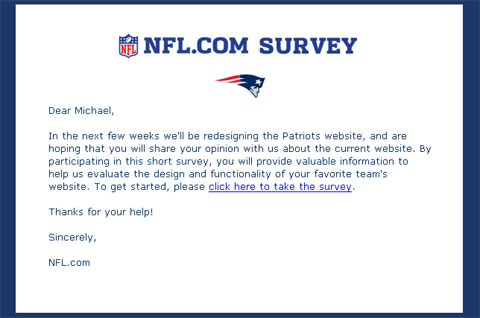
The message text read as follows:
Dear Michael,
In the next few weeks we'll be redesigning the Patriots website, and are hoping that you will share your opinion with us about the current website. By participating in this short survey, you will provide valuable information to help us evaluate the design and functionality of your favorite team's website. To get started, please click here to take the survey.
Thanks for your help!
Sincerely,
NFL.com
After reading it and re-reading it, as well as taking the brief survey, I had one question, are NFL team Web sites moving to a unified platform?
Such a move does not surprise me, as other sports leagues have taken a similar approach. Major League Baseball, or MLB, first comes to mind as they made this move many years ago. Other US pro sports leagues, such as Major League Soccer and the National Hockey League also have. The National Basketball League (NBA) appears to have, but the Boston Celtics Web site appears different from the other NBA team Web sites, though it does not mean it’s not on a common platform.
Having all team Web sites on a common platform provides many gains, which outweigh the negatives. First and foremost is cost and technical management – no need for 32 separate Web sites (there are 32 NFL teams), where you technically have one. Each team Web site (or section of the NFL site) will have a similar navigation structure, making it easy for the Web visitor to navigate from team-to-team. You still have your team-based content writers and coordinators, or whatever their title would be. You can also better leverage content across team sites with relative ease, both the written word and rich media, and the latter may be driving much of this. MLB has been very successful and providing broadcasts and audio and video of games, and charging for it. The NFL, which is known for its high-quality NFL Films, will probably make a similar offer.
If there are any drawbacks from combining Web sites is the complete control of the look and feel and overall content of the Web site. This will be more of an internal team issue than for the fans. Hopefully combining all Web sites will force all teams to offer a consistent level of quality content and design, where currently some team sites offer more content than others, not to mention some have a better design as others.
I performed a few searches and did not see anything specifically mentioning any form of unifying move. I welcome any thoughts and opinions on this, not just from a sports standpoint but from a branding and design view as well. Plus any insight into if the NFL is actually doing this is welcome too.
Did you enjoy reading this? You are welcome to subscribe to The Hot Iron by RSS feed or by email.
Subscribe to The Hot Iron



The Hot Iron strives to present unique content and point-of-view on business, technology and other topics by Mike Maddaloni, a technology strategist based in Appleton, Wisconsin.
Photo credit: Logan Connor/Oomphotography
Value for Value
If you like what you are reading on The Hot Iron, buy me a coffee!
About Links
In posts here at The Hot Iron there are often links and banner ads for products and services. For some of these links and banner ads, I receive compensation if you click and/or eventually buy said products or services. Where most links are marked as such, it is safe to assume any link or banner ad is a compensated one.