
Summer’s Gone
By Mike Maddaloni on Monday, September 04, 2023 at 11:23 PM with 2 comments

Labor Day in the US is considered by most people to be the last day of Summer. Granted planetarily it’s not for a few weeks more that Summer becomes Fall. At least here in the States the start of school – primary, secondary and even college – marks the end of when people or families will take summer vacation, though as I have talked about earlier there’s plenty of opportunity to get away thru the Fall.
That last statement is my opinion, and many people I know don’t share it. Back to school is pretty much the end of Summer in many minds. And if three months of summer was not enough, more and more Sum-sum-summertime is shrinking: many schools are starting classes as early as mid-August and some that do start after Labor Day are starting extracurriculars and athletics in the eighth month. This happened with my clan, as high school and club sports started the first full week of August. Fortunately we were able to squeeze a week away just prior to the restart of kids activities, and as you can see in the photo accompanying this post it was a great week at that.
With the start of school comes the start (or rather restart) of structure. Predictable schedules return with the kids return to classes. I am coming at this from a point-of-view of a household where both parents work remotely, and many reading this may homeschool or have other scenarios. Last-minute playdates and picking up of random summer job shifts and the logistics that accompany them slow to a manageable crawl around the weekends. That structure doesn’t make things less hectic, just more predictable. For as much as employers want to offer a work-life balance, stuff happens. Only having to work to one calendar for a majority of the day is a joy.
With summer in the rear-view mirror, the view is also blended with regret. Why didn’t we do this? Why didn’t we do that? If we only had more time! Where I don’t have as much of this as do others, I of course have some regrets. I try to focus on what we DID do, and in this day and age we also have about a million photos on our mobile devices to remind ourselves about it.
As I eluded to earlier and want to state overtly so it is not missed – I love Fall. September until the first snow fall is a great time, and read my post about top 10 reasons why that I wrote almost a decade ago that I still hold true.
Deconstructing the Change of Seasons
We can’t go back, but we can appreciative what we have. And yes, we can plan better for the future to mitigate any regret next Summer. I’ll also leave you with this – Summer by Buffalo Tom, somewhat of a sad song but one I listen to a lot this time of the year and the inspiration for the title of this post. Click on the link in the title or watch it embedded below.
This is from The Hot Iron, a journal on business and technology by Mike Maddaloni.
Did you enjoy this? Subscribe to The Hot Iron by RSS/XML feed or Read by Email
Diversions • Thrive • (2) Comments • PermalinkMy Takeaways From What Happy People Know
By Mike Maddaloni on Tuesday, August 15, 2023 at 06:55 PM with 0 comments
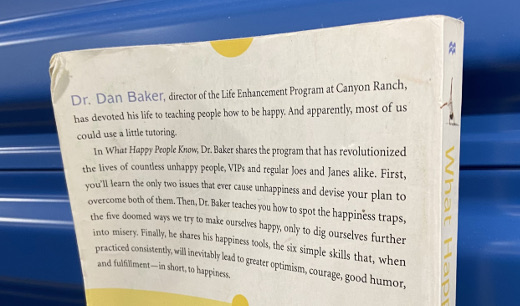
After sending a book I read to a good friend, he recommended a book back to me – he didn’t give me his copy of it as he said he rereads it every once in a while to “remind” himself. With a review like that, I promptly bought my own copy of the book and put it on my bookshelf. And there it sat, literally for years, until I recently read it. Long overdue, I wish I had read it sooner.
What was the book? What Happy People Know by Dan Baker. At the time of writing the book, Baker was the Founder and Director of the Life Enhancement Program at Canyon Ranch. If you’re unfamiliar with Canyon Ranch, it’s a wicked expensive resort yet worth every penny (so I have heard). As part of the overall resort, he worked with guests who were escaping from the day-to-day of life and trying to reset before reentry to the real world... which is my condensed assessment, not his words. As a result of his experiences there and throughout his career, he shares in this book what he has learned about the aptly titled book.
As I read through Baker’s stories, which in themselves were takeaways for me, I also had several specific takeaways.
Adaptation level theory – This theory states that once we become accustomed to any form of pleasure, it no longer has the power to make us happy. From too much sugar to too much money to too much vacation (if there’s such a thing), too much of anything can eventually be a bad thing.
We have 2 brains? – When talking about love, the association is always with the heart. If you asked people about this, they would say it’s emotional, however there is research this is actually physical and your heart communicates with your brain in a pairing called the heart-brain. This unity can be both beneficial and detrimental to your health depending on how your heart feels.
A bad case of the VERBs – Baker stated a patient had a case of victimization, entitlement, rescue and blame, or VERB. This resonated with me as I know I have had a case or 2 (at least) myself over the years and likely you reading this has as well. It’s something he says we do to ourselves and something we need to stop doing.
Sometimes we need help – Getting our stuff together is easy for some but not others. Even for those who mostly can get their stuff together, on occasion we may need help from others. Whether a loved one or a friend or a therapist, help is a good thing. It’s also ok if you observe someone having a challenge with their stuff to offer your help.
What Happy People Know is a good read and despite some sad stories, it is a very positive and encouraging read. I now know why my friend rereads is on a regular basis and I agree with him doing so. No matter your mood or outlook, this is a book that will get you thinking about attitude in a positive way. Where I may reread this in the future, for now I am giving away my copy to my nephew; he has been reading a wide variety of topics including many self-help books. I hope he and anyone else who reads it enjoys is as much as I did. And my friend too.
This is from The Hot Iron, a journal on business and technology by Mike Maddaloni.
Did you enjoy this? Subscribe to The Hot Iron by RSS/XML feed or Read by Email
Book Take-Aways • (0) Comments • PermalinkGood And Great
By Mike Maddaloni on Monday, August 07, 2023 at 07:33 PM with 0 comments
It’s been nearly 20 years since I took the Intro to Improv program at The Second City in Chicago, and nearly three-quarters of that time since I have performed with an improv troupe. Yet not a week goes by where I am recalling or leveraging something I learned or experienced from those days. Where I feel I haven’t done justice to writing about that intensely creative time in my life, allow me to share some advice that has stuck with me from then to today.
One of my instructors was Nick Johne, a veteran of The Second City main stage in Toronto (for those who don’t know the term main stage refers to the top improv troupe that performs on a theater’s main stage). My troupe was thrilled to have someone of his caliber to teach us, despite the fact that he could never remember any of our names. This was a minor detail, as he was a fountain of knowledge.
There were a couple of sayings he used during class. And they were truly expressions, as it was not just his words but his overall physicality that accompanied what he said that guided us. During a class we would do multiple scenes, mixing students throughout the session. After one scene, a fellow student said that something they did was bad. This was immediately dismissed by Nick, when he said (and of course I am paraphrasing but tightly), “there’s no such thing as bad or good in improv, there’s ‘good’ and ‘great.’” He elaborated that when someone performs, there is thought and effort involved and as a result it could not be “bad.” He instead called that “good.” On the flipside of good is “great,” where if what was performed was superior and to the point where Nick could “watch it all day” (another expression of his).
Not bad and good, but good and great.
This mindset has stuck with me over the years, and I think about it often in my personal and work life. We are often our own worst critics and I am no exception to that. Maybe by framing something as good but not great will help us the next time we do whatever it is we are being hard on ourselves over? As a way of motivating others around us, we can “yes, and” and say what they did was “good,” and here’s how we could make it “great.” Advice on making is great was something Nick would follow-up with when saying what we did was good.
In the case of improv, the response of good and great is almost instantaneous. Whether a teacher saying it or an audience audibly reacting to it. However we often don’t get feedback on what we do outside of the improv world that soon – if ever, and if so, sincerely. For ourselves and for others, we may have to be a little intensely retrospective to find what was good and great, as our first inclination may be what was bad and good.
Years later my wife and I went to a show on one of smaller The Second City stages in Chicago and there performing in the ensemble was Nick. She suggested that when I go up to him after the show and congratulate him on it – a common thing to do to actors and improvisors following a performance – I should mention I was one of his students years earlier. Where I did compliment him after the show, I didn’t add the second part of her suggestion, as I am sure he wouldn’t remember me.
Deconstructing Good and Great
So the next time someone asks you how your day was, and if it may not have been up to even your lowest expectations, respond that it was good. But not great, and that you hope tomorrow is a great day. It could be the beginning of an attitude change. I know that is my hope in doing so myself.
This is from The Hot Iron, a journal on business and technology by Mike Maddaloni.
Did you enjoy this? Subscribe to The Hot Iron by RSS/XML feed or Read by Email
Strategize • (0) Comments • PermalinkI Burst Out Laughing At My Mom’s Funeral
By Mike Maddaloni on Sunday, July 16, 2023 at 01:17 PM with 4 comments

Experts say there are 5 stages of grief after someone close to you dies. They are (and different sources may list them differently, but general consensus on Web searches were) denial, anger, bargaining, depression and acceptance. In said Web searches I never found laughter. Yes, laughter. However that is something I experienced at my own Mom’s funeral many years ago.
It was a late spring day just outside of Boston where we had my Mom’s funeral at her church. Though I lived close by, I had only been to her church a few times, as she often came to my church with me. The pastor of my church, Father Joe whom I wrote about after he himself had died, was awesome, and his sermons were always very real and relatable to me. He was also very helpful to me in understanding the logistics of a funeral, especially the “law” at the time that only one person could give a eulogy at a funeral. As this was over 20 years ago and in the midst of the sexual abuse scandal in the Archdiocese of Boston, this was very tough for me to digest. I opted to allow my sister to give the eulogy, but had a lot of input into it.
Where I had been to funerals ever since I was a child, this time it was me sitting in the first pew. We were guided through this by the church’s funeral coordinator and the funeral home that was extremely helpful – they had handled funerals for the likes of former House Speaker Tip O’Neill, so the Maddaloni family had nothing to worry about. As it was a funeral mass, it went through the regular Catholic mass sequence, then it came to the sermon by the priest. As I had only been to a few masses at my Mom’s church, I didn’t have a strong memory of the mass there leading up to her funeral. I had met the priest a few days earlier when he gave my Mom Last Rights. We felt bad for him at the time as he was an older priest and showed some discomfort after ascending the 3 flights of stairs to her apartment.
As the priest started his sermon, I was struggling to understand him. He had a very gravely, raspy voice. I knew he didn’t know my Mom personally, so I wasn’t listening for specific stories, rather a basic understanding of what he was saying. I clearly wasn’t alone, as I looked to my fiancée (now wife) and sister who also had a look of query as to what he was staying. Then it happened - a thought popped into my head that I couldn’t get out: his voice reminded me of Johnny Most, the legendary announcer for the Boston Celtics basketball team. It was right after that the next thought popped into my head that I couldn’t shake: the famous final play from the 1965 NBA Eastern Finals where the Celtics beat the Philadelphia 76’ers after Celtic John Havlicek stole the ball as the clock ticked to zero, giving the Celtics the win. Where the play itself was famous, the announcing by Johnny Most was legendary, with him screaming, “Havlicek stole the ball!”
For context, here’s a video of the game play and call by Johnny Most embedded below, or click this link to view the video.
At that point I lost it and started laughing. I tried to hold back the physical laughing but I could only hold back the sound. I hunched over to try to hold back but couldn’t and was physical shaking. My fiancée and sister looked over and wondered what was up and I was able to muster whispering, “Havlicek stole the ball!” to which they started giggling, but to no degree I was in utter laughter. My Aunt then looked over, wondering what the heck was going on, but in true Italian form, she remained calm and didn’t get into the middle of this. I eventually composed myself as his sermon ended, not remembering a word of it. But remembering that basketball play a few years before I was born helped me get through the funeral and the day.
Why Am I Writing This, And Now?
First I will address the timing of sharing this story. I never did tell my Aunt why I did what I did, as she likely thought like others at the funeral that I had simply broken down crying. I realized this as others consoled me after the funeral mass, and I never told anyone about this. I also promised myself I would never tell this story to my Aunt at all out of respect to her and would not share it until after she died. She left us a few years ago, and to say I miss her dearly is a gross understatement.
Recently people close to me have died or came close to it, and all of whom were at my Mom’s funeral. My good friend Peter died late last year after a long illness, in recent weeks my cousin Dinita died also after a long illness and last week my good friend Eric died unexpectedly. All of them live hours away from me, so though we were not physically close we kept in touch in varying ways over the years, but in hindsight it was not enough. I also had a scare with my good friend RJ as he woke up one morning finding out he had cancer, and just the other day he called to tell me after insanely intense treatment he is cancer-free. Fortunately he and I got together recently after too many years just before he got his latest great news.
As their families and my own are going through the stages of grief, I am sharing this story – with them and with the world – for their benefit and my own and to let them know there could be a moment of laughter among the pain, and that it is ok.
This is from The Hot Iron, a journal on business and technology by Mike Maddaloni.
Did you enjoy this? Subscribe to The Hot Iron by RSS/XML feed or Read by Email
Diversions • (4) Comments • PermalinkGoogle Domains Shutting Down Not A Second Too Soon
By Mike Maddaloni on Tuesday, June 27, 2023 at 11:04 AM with 0 comments

They say, “all good things must come to an end.” Whoever they are, they may have also said “even some not so good things come to an end as well.” The latter will fortunately come true in the form of Google announcing it is getting out of the domain name business and selling their domain registrations to Squarespace.
This news from the Big Tech behemoth came out late in the day on June 15 with little fanfare. I heard about it on a social media post and had to dig to find the press release announcing the deal. Even as of the writing of this post close to a couple of weeks later there is no mention of the deal on the home page of Google Domains. Digging into Google help I was able to find a mention of it. Not surprising to me, there is mention of it on Squarespace’s home page, with a link to a robust welcome page.
If you can tell by my choice of words so far, I think this is a very good thing. Why? Where Google loves collecting information about people, they don’t like dealing with people. You can’t exactly pick up the phone and call Google for support on their end-user consumer products, everything from Gmail to their Web advertising product AdSense. Interestingly on the Google Domains home page it states you can “get 24/7 Google support from real humans” which made me laugh, for as recently as within the last year that was not the case.
Out with the Old and In with the New
In the course of performing my primary income source (aka my job) I deal with many domain registrars, including Google. Many of my clients have had problems with Google domains as the login to the registrar service is integrated with the overall Google login process. Some clients have had turnover in their business and have had issues getting back into their accounts. In one case, a Web site was down for over 2 weeks because of this. No telephone support was available to accept a credit card to renew the domain name and following their automated account recovery process sadly took that long. I’m not sure exactly when they added real humans to the mix, but it is too little too late in my mind, and I have for years been suggesting people use other registrars like Name.com.
Squarespace, on the other hand, is a service designed for the non-technical user, and will likely be a good home for those domain names leaving Google. If you view the landing page I mentioned earlier they have a nice, stylish page welcoming over Google customers and highlighting the services they offer for domains, including reselling Google Workspace. This makes sense, if Google doesn’t like people and Squarespace does, it’s a win-win.
Trust and Track
If you have domain names registered through Google you can leave them there and they will be migrated to Squarespace. However you should watch for emails from both vendors to watch for specific dates and double-check all services using your domain names to ensure they are operating correctly following the move. If you are a little more technical, you may want to capture the DNS settings for each of your domain names in the event there are issues post-migration. You also have the option to transfer your domain names to any other registrar like Name.com that I have personally used for years. Note I have no stake or referral code with Name.com, but they do offer real humans who offer stellar support out of their Denver, Colorado headquarters.
Google Domains is yet another business that the search and more firm has shelved. A nice list is available at Killed by Google which lists all of their former services – some I miss, some I am glad are gone. Google Domains has already been added to the top of the list ahead of their scheduled September, 2023 shutdown.
Deconstructing Google Domains Demise
Internet-based services come and go quite often. Google Domains is one of them, but their door shutting will open a new door for their customers with Squarespace. No matter where your domain name is registered, always update your contact information and payment methods, and keep a list of them and their expiration dates outside of the registrar account for safekeeping of these vital digital assets.
This is from The Hot Iron, a journal on business and technology by Mike Maddaloni.
Did you enjoy this? Subscribe to The Hot Iron by RSS/XML feed or Read by Email
Announcements • Domain Names • Strategize • (0) Comments • PermalinkSubscribe to The Hot Iron



The Hot Iron strives to present unique content and point-of-view on business, technology and other topics by Mike Maddaloni, a technology strategist based in Appleton, Wisconsin.
Photo credit: Logan Connor/Oomphotography
Follow Mike on Mastodon.
Value for Value
If you like what you are reading on The Hot Iron, buy me a coffee!
About Links
In posts here at The Hot Iron there are often links and banner ads for products and services. For some of these links and banner ads, I receive compensation if you click and/or eventually buy said products or services. Where most links are marked as such, it is safe to assume any link or banner ad is a compensated one.