
SpinVox Through uReach A Suitable Replacement For Ribbit Mobile
By Mike Maddaloni on Thursday, March 01, 2012 at 10:59 AM with 5 comments
The blue skies and green pastures of Ribbit Mobile are no longer, but if you can’t live without mobile voicemail to text, you can get it from SpinVox through uReach.
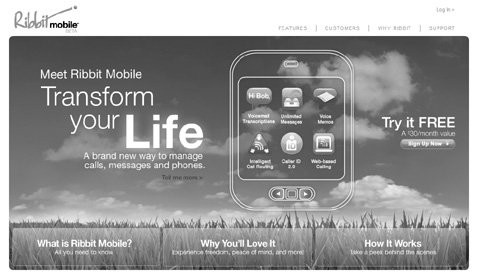
(Note the above image of the Ribbit Mobile home page was changed to grayscale by me)
Ribbit Mobile was a service for translating voicemail messages to text and delivering that text message with an audio file of the voicemail message, and those messages would be delivered by email and SMS. For myself, I have used similar services for over 4 years, and having the luxury of reading the text of a voicemail when you don’t have the opportunity to dial in to listen (e.g. when you’re in a meeting), not to mention the ready-access archive of messages, was priceless.
And that was just the case with Ribbit Mobile – they were not charging for “beta” this service for the 2+ years I used it. Near the end of last year I recall getting a survey from them on how much I would be willing to pay for the service. Then in January of this year I got an email saying Ribbit Mobile would be shutting down altogether the end of January, and there was no alternative. Ribbit itself as a company would still be around as they offer other services, like an Android app for voicemail and an add-on to Salesforce.com. The service was still running for a couple of weeks after the announced date, and went down altogether on February 16.As I said, this was a type of service you could get used to. I also have a similar voicemail to text service through Vonage which I use for my business phone. Prior to Ribbit Mobile I was part of the SpinVox consumer beta program which I talked about previously here at The Hot Iron. Interestingly, around the time SpinVox announced they were dropping their B to C service (they power Vonage’s voicemail to text) Ribbit Mobile came on the scene, and I was able to switch over with very little time without this type of service.
In between SpinVox and Ribbit Mobile I briefly used SpinVox through uReach, a company offering virtual voice, email and office solutions used by many small businesses. When Ribbit Mobile went away, I looked into see if it was still offered, and it took a call to uReach to find the “hidden” URL for the service (they offer it, but it’s not linked from their main Web site), and by visiting ureach.com/spinvox one can sign up for the voicemail to text service for $9.99/month plus usage fees for large volumes of voicemail. The uReach offering is not as robust as Ribbit’s, and for some reason breaks up voicemails when sent by SMS into several messages of 30 second lengths. But you can still get an email with the message text and audio file attached.
Am I the only one who will miss Ribbit Mobile? Am I the only one who uses voicemail to text? Please let me know in this post’s comments, as I know nobody else personally who uses, and loves, this type of service.
Did you enjoy this? Subscribe to The Hot Iron by RSS/XML feed or Read by Email.


This is from The Hot Iron, a journal on business and technology by Mike Maddaloni, Founder and President of Web consulting firm Dunkirk Systems, LLC.
Build • Business • Mobile Technology • Technology • (5) Comments • Permalink
Tweet To Vote For YouthBuild Boston To Win in Nokia Care US Contest
By Mike Maddaloni on Tuesday, November 15, 2011 at 01:39 AM with 0 comments
If you are on Twitter, please tweet the following to help a great charity I support, YouthBuild Boston, win $2,500 from Nokia. All you need to do is click on the following link:
Click here to tweet/vote!
If the link does not work, please copy and paste the text to tweet it.
I’m voting for Entry #15 in the #NokiaCareUSContest! RT and help us win. [url=http://on.fb.me/tyNRR7]http://on.fb.me/tyNRR7[/url]
 By tweeting this, you are entering YouthBuild Boston in a contest run by Nokia Care US, the domestic support arm of the mobile phone giant. There are 15 charities around the US vying for this, and the top 10 charities, as counted by the number of tweets they receive, will make it to the final round, where judges will select the winner of the $2,500 prize.
And I couldn’t think of a better charity to win this prize! YouthBuiild Boston, or YBB for short, is located in the Roxbury section of Boston and daily lives their tagline of “strengthening you, rebuilding communities.” This is the description of YBB which I submitted when I nominated them for this contest:
Since its inception, YouthBuild Boston (YBB) has been dedicated to improving the lives of young people of Boston by teaching skills that will enable them to become both self-sufficient and civically engaged. While YBB promotes the core values of youth development and community service, it stands out as an innovative non-profit by offering young people a hands-on approach to skills training and community building.
Its Theory of Change is predicated on the belief that, “young people, when empowered with the skills and education necessary to improve their quality of life, will realize that they can play a leadership role in strengthening their communities.” From construction to landscaping to design skills to encouraging and supporting young people to get their GED degree, YBB has become a cornerstone for all whose lives are touched by their work. During its 20 year history, YBB has helped more than 1,000 young people develop the skills and opportunities necessary to successfully enter the workforce.
YBB has adapted to the needs of the community over the years and their programs reflect it, branching out from their early programs solely on construction. They also offer the greater Boston community the opportunity to get involved, benefitting the students even more. As a result of what they do and how well they do it, YouthBuild Boston has gained a stellar reputation in the community, and with your support they can only make a greater impact.
I have been proud to support YBB for almost a decade, going back to when I lived in the Boston area, helping them with their Web technology over the years. What impresses me most about YBB is not only the amazing things they do, but also how they do it. Their level of professionalism is only matched by their dedication and compassionate service to the youth who are involved with their programs as well as to the community.
The deadline for tweet voting is this Friday, November 18, 2011. One vote per person, but feel free to pass it along to your friends. More information on the contest is available on the contest page on Facebook. As this is a contest sponsored by Nokia, and I evaluate their mobile devices on this blog, I must mention that, but it will have no impact on this contest.
Click here to tweet/vote!
Did you enjoy this? Subscribe to The Hot Iron by RSS/XML feed or Read by Email.
This is from The Hot Iron, a journal on business and technology by Mike Maddaloni, Founder and President of Web consulting firm Dunkirk Systems, LLC.
Announcements • Business • Mobile Technology • Thrive • (0) Comments • Permalink
Nokia E6 Unboxing And Thoughts
By Mike Maddaloni on Friday, October 28, 2011 at 06:00 AM with 0 comments
Granted, the talk this week has been on the announcements coming from London at Nokia World about new Windows Mobile devices as well as new devices specifically designed towards emerging markets. However, a few months back I had the opportunity to evaluate a Nokia E6,which is still alive and well and selling in the US and other countries.
Thanks to the folks at Nokia Connects (formerly WOMWorld/Nokia) I was able to use this device for a few weeks. But first I had to open the package, and here’s my initial reaction to the E6 – view the embedded video below or watch the Nokia E6 unboxing video on YouTube.
It wasn’t until I watched the video that I realized the heavy comparisons I made between the E6 and the Nokia E72, which is my primary mobile device, or my “workhorse” as I like to call it. This was due to the form factor, which are very similar. Besides that and the quality of the construction, these devices are different. On the hardware front, it has a touchscreen, something I miss from my days as a Palm user. The camera is a mixed blessing – taking 8 megapixel photos but with a full-focus rather than auto-focus camera. With some of the tests I did – mostly of my kids so I won’t post them here – the full focus worked great when they sat still (rarely) and was a disappointment when they were moving or I wanted to get a close-up shot (usually the case).
In my evaluation period I did not completely switch to using it, namely a time issue for me. But I did carry the 2 devices with me at the same time and tried similar tasks and did put my SIM card in it and used it for calls. I was pleased with its usability and liked the Symbian^3 features that I am still getting used to. The main reason I still use the E72 – the physical keyboard – is also a selling point for the E6. Granted I could probably get used to an on-screen keyboard eventually, but for how I use a device, it’s nice to have the physical keys to bang on.
Where the E6 will fit into the mix of Nokia’s devices is unclear, but I guess its price may drop, which will put a touchscreen, full keyboard mobile device in the hands of many people easily, and no need to go thru a Blackberry service as you can directly connect to POP and Exchange mail!
Below is an embedded slideshow of photos I took of both the E6 and E72 – view it there or on Flickr.
The device has long been returned to Nokia Connects, but I welcome your thoughts and questions on it in the comments.
Did you enjoy this? Subscribe to The Hot Iron by RSS/XML feed or Read by Email.
This is from The Hot Iron, a journal on business and technology by Mike Maddaloni, Founder and President of Web consulting firm Dunkirk Systems, LLC.
Build • Mobile Technology • Technology • (0) Comments • Permalink
Nokia C7 Astound Unboxing Video
By Mike Maddaloni on Friday, September 09, 2011 at 06:00 AM with 0 comments
On the heels of evaluating the Nokia E7, I received a few days later a Nokia C7 mobile device, or the Astound as it’s called here in the US, where it’s exclusively offered by T-Mobile. It was graciously offered to me by the kind folks at WOMWorld/Nokia to use for a few weeks. You can read more about my relationship with Nokia in this previous post.
Rather than create the “same old” unboxing video, where I go to a quiet corner of my office and unwrap the package and give my first impressions of the device on video, I decided to go “on location” this time. I chose to film it in front of the Cloud Gate artwork (better known as “the Bean”) at Millennium Park in Chicago.
Watch the video embedded into this post below, or click this link to view the Nokia C7 Astound Unboxing Video on YouTube.
As I was making the video, both the E7 and my trust workhorse the E72 came to mind. Though the C7 has a little smaller screen than the E7, it also has a much smaller price – it has been as low as free when renewing a contract with T-Mobile. I know this, as this is how I got a C7 of my own after I sent back the evaluation device. Where it is a safe assumption I like the C7 as I acquired one, I don’t want to get too far into the evaluation than this video. Currently I swap between the C7 and the E72 as needed.
I welcome your comments – positive and snarky – on the video, and the device as well. And let me know how obvious it is that I was interrupted by a panhandler when I was making the video! Your comments are welcome here on The Hot Iron as well as on YouTube.
Did you enjoy this? Subscribe to The Hot Iron by RSS/XML feed or Read by Email.
This is from The Hot Iron, a journal on business and technology by Mike Maddaloni, Founder and President of Web consulting firm Dunkirk Systems, LLC.
Mobile Technology • Strategize • Technology • (0) Comments • Permalink
QR Code Buried On Outdoor Signage
By Mike Maddaloni on Thursday, April 07, 2011 at 05:05 PM with 1 comments
QR codes are not afraid of heights. Despite this, they still tend to be placed in obscure places, and in this place, mere inches from the ground.
The following sign was up for the month of September last year in Chicago’s Millennium Park.
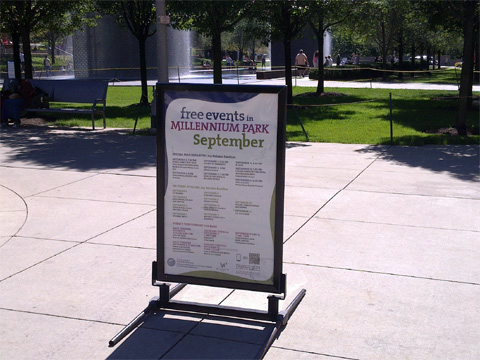
From a distance, you can barely see the QR code at the bottom right of the sign. I saw it, but I digress. Here’s a closer shot of the sign.
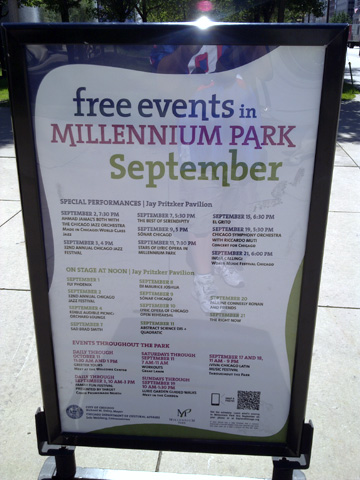
I was able to get a closer shot, but I had to squat down to take the picture.
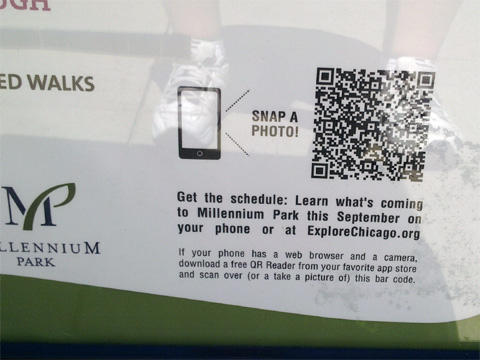
The code did work at the time, but it brings up an error, now several months later.
Where it’s always nice to see a QR code in action, why implement one so poorly? The position so low to the ground makes it less likely to see, let alone scan. If you do scan it, you’d have to squat down or have to bend over in an awkward position. The description accompanying the code could be made much clearer and concise. I also encountered issues scanning the code as the protective clear plastic over the poster caused a reflection and didn’t allow me to quickly scan the code.
How could this have been improved? By simply moving it from the bottom right to the top right would have helped adoption. This would have positioned it at just above waist level, that is for someone like myself just under 6 feet. Making the accompanying text clearer may have helped as well, or simply having it say, “scan here or visit explorechicago.org” would have been all that was needed.
So, would you have even bothered to have scanned a code in such a location? Share that or any other thoughts in the comments of this post.
Did you enjoy this? Subscribe to The Hot Iron by RSS/XML feed or Read by Email.
This is from The Hot Iron, a journal on business and technology by Mike Maddaloni, Founder and President of Web consulting firm Dunkirk Systems, LLC.
Build • Mobile Technology • QR Codes • QR Codes In Action • (1) Comments • Permalink
Subscribe to The Hot Iron



The Hot Iron strives to present unique content and point-of-view on business, technology and other topics by Mike Maddaloni, a technology strategist based in Appleton, Wisconsin.
Photo credit: Logan Connor/Oomphotography
Follow Mike on Mastodon.
Value for Value
If you like what you are reading on The Hot Iron, buy me a coffee!
About Links
In posts here at The Hot Iron there are often links and banner ads for products and services. For some of these links and banner ads, I receive compensation if you click and/or eventually buy said products or services. Where most links are marked as such, it is safe to assume any link or banner ad is a compensated one.