
What I Learned This Week For June 6 2014
By Mike Maddaloni on Tuesday, June 10, 2014 at 11:55 PM with 3 comments
Processing the virtual sticky notes in my BugMe app on my iPhone that I accumulated with what I learned, here they are…
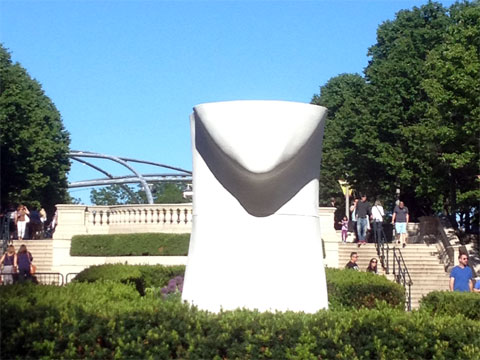
- So what is that pictured above? It is a large toilet? Or a statue of Jay Leno’s chin? No, it is the start of one of the 4 new sculptures as part of the 1,004 Portraits installation at Chicago’s Millennium Park. The artist who created the Crown Fountain is behind this, as this sculpture and 3 others in a more inconspicuous location are extensions of the original 1,000 portraits that are illuminated on the glass block towers that is the hottest attraction on summer’s hottest days. This giant head will be looking at me for the next year and a half.
- Speaking of the Crown Fountain, they finally aligned the video with the spitting water, so the water looks like it is coming out of the people’s mouths, rather than their lip or moustache as it has been for the last couple of years.
- Like many of you, I have been wondering what Goldie Hawn has been up to the last few years. It turns out she has a foundation, appropriately called The Hawn Foundation, which aims to create programs to help kids learn and grow emotionally stable, all without pharmaceuticals. I haven’t looked into this fully, but I have been following them on Twitter as their goal sounds noble.
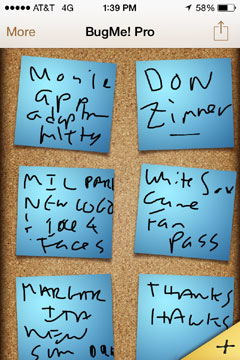 Thank you Chicago Blackhawks for another hard-fought exciting season of hockey. Watching you lose in overtime in the final leading to the Stanley Cup was heartbreaking, but you made it interesting leading up to it.
- The Caribou Coffee shop at 20 Michigan Avenue in Chicago is closing on June 15. Right next door to it is a Starbucks, and next to that a Panera Bread and around the corner from it is another Starbucks. Going the other way is a Caffe Baci where you can get coffee, a Walgreen’s where you can get anything to drink, then next to it a 24 hour Dunkin Donuts, and next to it Toni Patisserie where you can get coffee too. Oh, and around the corner is the Pittsfield Café, which serves a great inexpensive breakfast and, you guessed it, coffee.
- Though I will still be drinking coffee, my warm weather drink has become the margarita – on the rocks with no salt.
- I received an email that the Box Tops Marketplace, where you could earn virtual Box Tops for Education for your favorite school by simply clicking on a store link, is closing as of July 31. With the simplicity of earning points which are essentially affiliate referrals, I am surprised it has been around this long.
- Good luck Jen on your new adventure! We will miss you, and I am sure you will miss us when you’re cashing in all of those frequent flyer miles and sitting in first class.
- When I took my daughter on a play date with her friend to a Chicago White Sox game, her first large sporting event, I was a little sad when I found out the tickets were virtual, a QR code to be scanned from the TicketMaster app. But low and behold, upon scanning them the ticket agent printed an “MLB Fan Pass” which is essence a ticket stub. So now she has something for her scrap book.
- This past week baseball journeyman Don Zimmer died too young at 83 after serving three score and 6 years in the game he loved. I will always remember him as manager of the Boston Red Sox when I was growing up, and with all of the other teams he played or coached for, many people will have their own memories of him. One thing I learned about him was he was the catalyst for baseball introducing batting helmets.
- Is it just me or am I the only person trying to do enterprise mobile app adoption, marketing and promotion?
- Something happened this week when trying to rearrange my work schedule and I said out loud, “great googly moogly” and thought of the infamous Snickers commercial. I have embedded it below or click the above link to watch it on YouTube, and tell me in the comments ot this post if we should try to bring back that phrase!
This is from The Hot Iron, a journal on business and technology by Mike Maddaloni.
Did you enjoy this? Subscribe to The Hot Iron by RSS/XML feed or Read by Email.


Announcements • Business • Diversions • QR Codes • Technology • What I Learned • (3) Comments • Permalink
QR Code Buried On Outdoor Signage
By Mike Maddaloni on Thursday, April 07, 2011 at 05:05 PM with 1 comments
QR codes are not afraid of heights. Despite this, they still tend to be placed in obscure places, and in this place, mere inches from the ground.
The following sign was up for the month of September last year in Chicago’s Millennium Park.
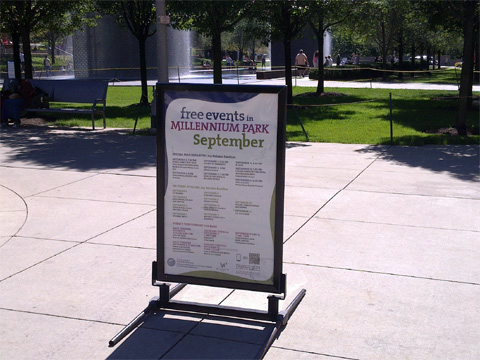
From a distance, you can barely see the QR code at the bottom right of the sign. I saw it, but I digress. Here’s a closer shot of the sign.
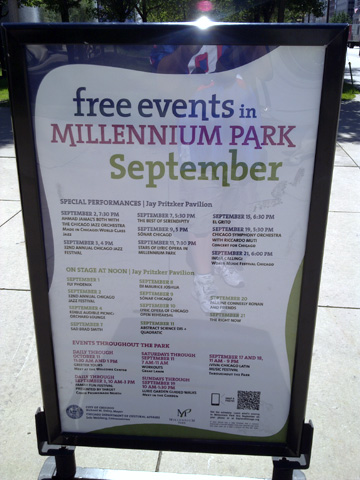
I was able to get a closer shot, but I had to squat down to take the picture.
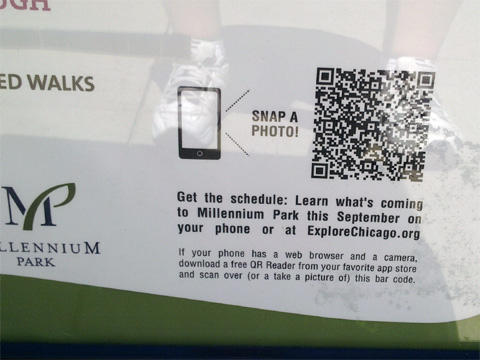
The code did work at the time, but it brings up an error, now several months later.
Where it’s always nice to see a QR code in action, why implement one so poorly? The position so low to the ground makes it less likely to see, let alone scan. If you do scan it, you’d have to squat down or have to bend over in an awkward position. The description accompanying the code could be made much clearer and concise. I also encountered issues scanning the code as the protective clear plastic over the poster caused a reflection and didn’t allow me to quickly scan the code.
How could this have been improved? By simply moving it from the bottom right to the top right would have helped adoption. This would have positioned it at just above waist level, that is for someone like myself just under 6 feet. Making the accompanying text clearer may have helped as well, or simply having it say, “scan here or visit explorechicago.org” would have been all that was needed.
So, would you have even bothered to have scanned a code in such a location? Share that or any other thoughts in the comments of this post.
Did you enjoy this? Subscribe to The Hot Iron by RSS/XML feed or Read by Email.
This is from The Hot Iron, a journal on business and technology by Mike Maddaloni, Founder and President of Web consulting firm Dunkirk Systems, LLC.
Build • Mobile Technology • QR Codes • QR Codes In Action • (1) Comments • Permalink
Time Magazine Artistic QR Codes
By Mike Maddaloni on Thursday, March 17, 2011 at 12:55 PM with 4 comments
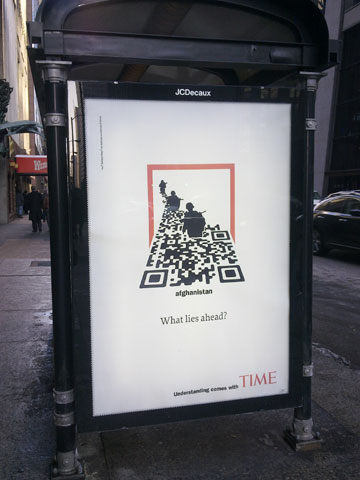 Can QR codes be artistic? Of course, and if you need examples right away check out the QR Arts site. When large corporations use QR codes, many notice. When major corporations do something artistic with QR codes (or anything artistic for that matter) people notice even more. That is, if you recognize it is an artistic QR code.
The accompanying photo is of a bus kiosk ad in Chicago for Time magazine. The familiar red border of Time is clearly visible. It looks like soldiers are walking in a swamp, but they are actually walking in a QR code! The code itself is rotated 180 degrees so all 3 large corner squares are visible, which is a very valid use for them. It is also angled back. Both of these are why I question if to the casual person walking by, will they realize it is a QR code? Upon scanning the QR code, you are taken to a page on Time’s Web site on the topic of war.
What do you think – upon first glance would you think this is a QR code? Your thoughts are welcome in the comments for this post.
Did you enjoy reading this? You are welcome to subscribe to The Hot Iron by RSS feed or by email.
QR Code In Name.com Email Links To Android App Download
By Mike Maddaloni on Wednesday, March 09, 2011 at 07:17 AM with 0 comments
In the past I have said QR codes are a way of tying the offline and online worlds. After seeing the use of a QR code I am writing about today, I am changing that statement to this: QR codes are a nexus between mediums.
Name.com is a great domain name registrar I use personally and for my business (note the link is an affiliate link). They have a clean and intuitive user interface that does not bombard you with upselling options at every click! They also provide outstanding and efficient human support whenever I need it. As part of that service, Name.com have recently launched an app for Android mobile devices, allowing you not only to register new domain names, but backorder domains as well as manage your entire account. They announced this with an email message as pictured below.
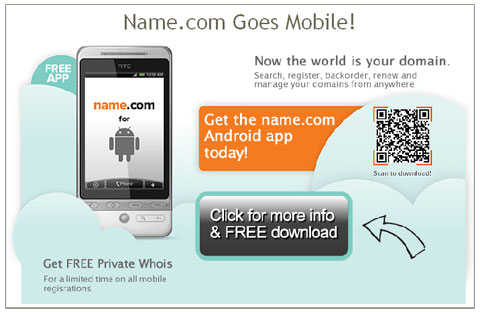
In it, there is a QR code. It links to a page on their Web site for the app. The email message is consistent in design with the Web page. The options they include on this Web page, including the ability to download it by SMS (texting to us in the US) and email, as well as a QR code taking you directly to the Android Market.
In this case, the QR code was a bridge between digital mediums – email and the Web. Of course if I read this email on my mobile device I wouldn’t be able to scan it, but as I opened it from within my Thunderbird email client, it worked. An argument can be made whether to link directly to the Android Market from the email rather to a landing page which then links to the Market. This is a great scenario for performing A/B or split testing on the email message, which they may have done anyway. Overall I believe this email from Name.com does a decent job of communicating the value behind the QR code.
What do you think of this QR code use? Would you link directly to the Android Market? Have you or would you use a QR code in an email message? You are welcome to share your thoughts and opinions in the comments of this post.
Did you enjoy reading this? You are welcome to subscribe to The Hot Iron by RSS feed or by email.
Kellogg’s New Crunchy Nut Cereal Uses QR Code To Reinforce Marketing
By Mike Maddaloni on Wednesday, March 02, 2011 at 08:27 AM with 6 comments
A visit to the cereal aisle of a US supermarket is always an overwhelming experience, as with each visit it appears that there’s even more choices to make. In this crowded field of breakfast foods, you need to stand out somehow, and why not with a QR code?
A new variety of cereal, Crunchy Nut from Kellogg’s, featured a QR code on the back of its cereal box as shown below:
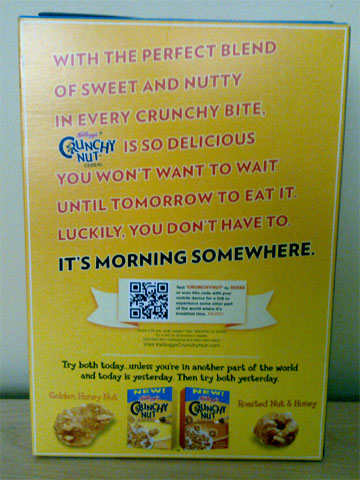
Note there was not a QR code on the front of the box, and I discovered this when I went to buy the cereal. The detail of the QR code is shown below:
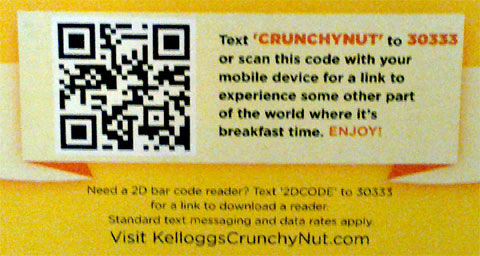
Upon scanning the code, you are taken to a mobile Web optimized site where it shows a video reinforcing its marketing message about eating the cereal day or night because “it’s morning somewhere.” I have visited the site a few times and I observed different videos.
This a good example of a presentation of a QR code as well as what it links to. In a prominent location, the message offers both the option to send an SMS message or to scan the code, and below it tells the cereal eater how they can get a reader app, and if they do so, they may be charged for it. In this case, Kellogg’s chose to call it a 2D bar code, and my guess all of this text was vetted by their legal department and thus it is called as such, as technically QR code is a trademarked name, but offered as an open standard.
Only if the cereal lived up to the quality of the QR code presentation – it was a little bland for my taste, and not that crunchy either, but I digress. The QR code won me over in this case.
Did you enjoy reading this? You are welcome to subscribe to The Hot Iron by RSS feed or by email.
Subscribe to The Hot Iron



The Hot Iron strives to present unique content and point-of-view on business, technology and other topics by Mike Maddaloni, a technology strategist based in Appleton, Wisconsin.
Photo credit: Logan Connor/Oomphotography
Follow Mike on Mastodon.
Value for Value
If you like what you are reading on The Hot Iron, buy me a coffee!
About Links
In posts here at The Hot Iron there are often links and banner ads for products and services. For some of these links and banner ads, I receive compensation if you click and/or eventually buy said products or services. Where most links are marked as such, it is safe to assume any link or banner ad is a compensated one.